
★★★★★
I got the motherboard issue fixed on my 16” MacBook Pro. No data was lost, and everything is the same as before. As promised, I also received a 60-day service warranty. Thank you, iDevice! 😊
Service · Air, Pro, Retina, Apple silicon
Apple replaces boards. We repair them. Microsoldering, flexgate, staingate, butterfly keyboards, swollen batteries, liquid damage and Touch Bar faults — with your original storage, and your original data, kept where it belongs.
The four MacBook faults we see most
Looking for the price? The price guide for this page is further down — jump straight to it ↓. Diagnosis is free on a walk-in, you get the price in writing before any work starts, and if we cannot fix it you do not pay a repair fee.
On this page
When Apple diagnoses a MacBook as having a board fault, the remedy is a new board. It is fast, it is reliable, and on a machine under AppleCare+ it is the correct choice. Out of warranty, the same remedy costs a large fraction of a new machine — and on Apple silicon it can cost you your files as well.
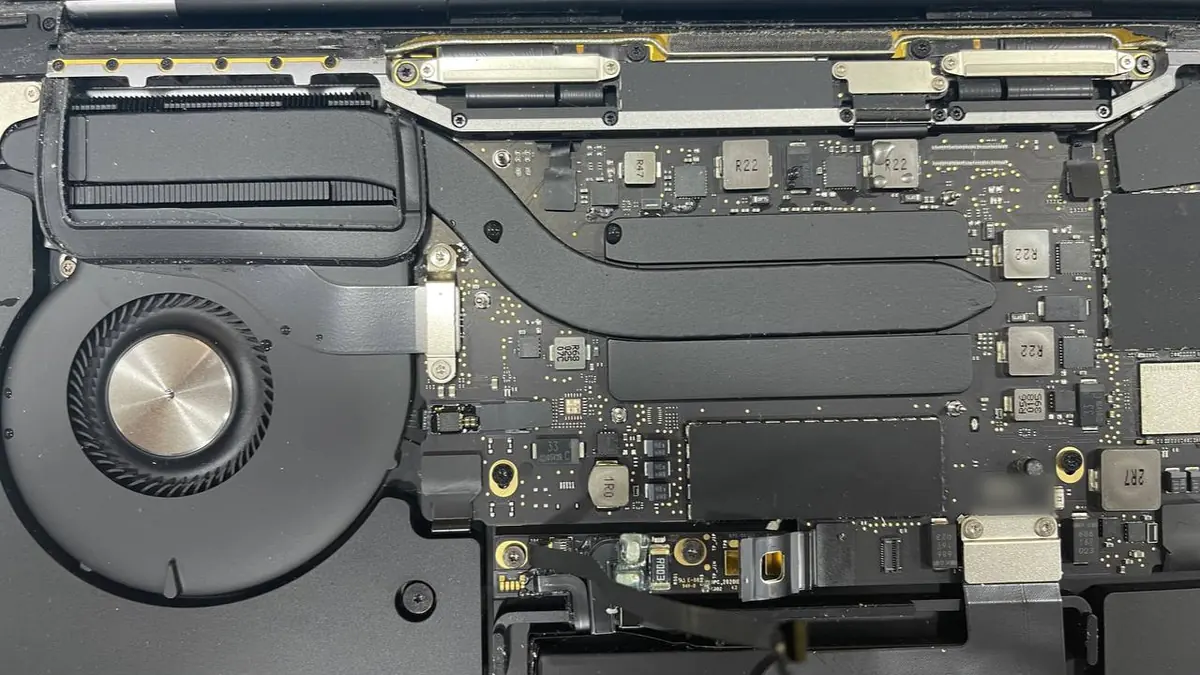
A logic board is a repairable object. The faults are unglamorous and repeatable: a ceramic capacitor on the PPBUS rail fails short and the board draws current without booting; a USB-C port IC dies after a static event and one port stops charging; the SMC's power sequencing stalls because an enable line is pulled low by a corroded resistor. Each of these is a component, a schematic reference, a boardview location, and twenty minutes of careful rework under a microscope. Each of them, on Apple's remedy path, is a whole new board.
We work with preheat, hot air, low-melt solder for delicate lifts, and a thermal camera to find shorts by where the board gets warm. Every board is photographed before and after, and we show you both. That is not showmanship — it is the only way you can verify that a component-level repair actually happened.
Apple silicon MacBooks are, mechanically, easier to work on than the late Intel machines. Fewer thermal problems, no Touch Bar on most models, and a Magic Keyboard that is a genuine improvement. Electrically, the repair categories are familiar: power delivery, USB-C port ICs, charging circuits, display connectors, audio.
One thing changes everything: the SSD is soldered to the board and cryptographically paired to the Secure Enclave. Move the storage chips to another board and they are unreadable. Replace the board and the data does not come with it. This produces a rule we apply without exception on Apple silicon:
On any Apple silicon MacBook with a board fault and no backup, our first job is to bring the board up for long enough to read the storage — even if the board will not survive. Only then do we discuss the repair. A shop that replaces the board first has made an irreversible decision on your behalf.
Most owners want one thing settled before they read anything else: do we take their machine. Almost certainly yes. Intel and Apple silicon sit on the same bench, because the mechanical work is the same discipline and the board work is the same microscope. By family:
The model matters less than the fault. A swollen battery is a swollen battery whether it sits in a 2013 Air or a 2024 Pro; what changes is how the pack is adhered and how long the strip-down takes. Send us the model and year from Apple menu → About This Mac, plus one line on what the machine is doing, and we will tell you which of the repairs below yours is likely to need — or tell you honestly that it is not worth the money.
Flexgate affects 2016–2017 MacBook Pro models. The display data and backlight cables were routed around the display board with too little slack; opening and closing the lid tens of thousands of times wears the backlight flex through. The tell is a "stage light" effect — uneven bright patches along the bottom of the screen — followed by the backlight failing entirely past roughly 40° of lid opening. On some revisions the cable is replaceable; on others the display assembly is the honest answer. We check the model and the cable revision before we quote anything.
Staingate is the anti-reflective coating lifting off the Retina glass, usually starting where the keys touch the panel when closed. It is cosmetic and it does not spread to the panel itself. The coating can be removed to leave a clean, slightly glossier screen, or the assembly replaced. Both are valid; the cheap one is often the right one.
Beyond those two, we handle cracked panels, dead backlight circuits (very often a single fuse or a blown backlight driver on the board rather than a new screen), vertical lines, and hinge and clutch-cover damage — covered in full on our dedicated MacBook screen replacement page, including the economical panel-only route. Read more on our general screen replacement service too.
Between 2015 and 2019 Apple shipped the butterfly mechanism, which is thin, pleasant to type on when working, and famously intolerant of a single crumb. Because the keyboard is riveted into the top case, a keyboard replacement on those machines is a top-case replacement — battery, trackpad and speakers included. That is expensive, and it is Apple's design rather than a shop's markup. If only the speakers have failed, ask about a MacBook speaker replacement: where the model allows, we can replace the speaker alone rather than the whole top case.
Where a single key sticks and the underlying butterfly clip is intact, we can often replace the keycap and mechanism alone, or clear debris with compressed air at the correct angle. Where a spill has reached the membrane, the top case is the repair. On 2019-and-later Magic Keyboard machines the mechanism is a conventional scissor design and the failure rate has collapsed. Full detail, including the keyboard-only route where a model allows it, is on our dedicated MacBook keyboard replacement page; our general keyboard replacement service covers Windows laptops too.
macOS reports cycle count and condition under System Information. A MacBook battery is considered consumable at around 1,000 cycles, but the number that predicts swelling is not age — it is time spent at a high state of charge in a hot environment. A machine left permanently on a charger in a warm Singapore apartment ages faster than one cycled properly.
A swollen battery lifts the trackpad, prevents the lid from closing flush, and eventually rocks on a flat desk. Treat it as urgent, not cosmetic. We replace the cell, verify charging behaviour, and dispose of the old pack through a licensed e-waste channel — full detail on our dedicated MacBook battery replacement page, including the battery-pack-only route. More on our general battery replacement service too.
Everything on our liquid damage guide applies, with one amplification: MacBook boards are dense, the SMC and its supporting circuitry sit near common spill paths, and on Apple silicon the storage is on the board. Same-day intake changes the outcome more here than on any other laptop. Power off, do not plug in, do not press keys, and come straight in.
The best MacBook repair often fits no new part at all. When a capacitor shorts a rail or a charging IC fails, the fix is the original board with one component replaced — there is nothing to source, and the machine leaves with the same board Apple built. That is the heart of our MacBook logic board repair work, and it sidesteps the whole genuine-versus-aftermarket question entirely.
When a part genuinely has to be fitted — a display assembly, a battery pack, a flex cable, a top case — we use genuine service parts or grade-A equivalents, and we name exactly which on your job sheet before you agree to anything. Aftermarket has its place: a grade-A panel or a quality battery cell can restore a five-year-old machine for a sensible price when a genuine assembly would cost more than the laptop is worth. It also has real trade-offs, and we would rather you hear them from us than discover them later. The honest version is that the right part depends on the age of the machine, what you paid for it, and how long you intend to keep it — the same judgement we apply across every Apple device on our Apple repair bench.
On recent MacBooks, some parts are serialised to the board. Fit a non-Apple display, battery or Touch ID assembly and macOS may show a service notification, or a feature such as True Tone may need re-calibration. This is Apple's pairing system, not a fault in the part. We tell you where it applies before we fit anything, so there are no surprises in System Information afterwards.
Honest turnaround depends on the fault, not on a promise made at the counter. A battery, a screen, or a single failed component is often same-day to a few days. Board-level microsoldering takes as long as the fault takes to trace — sometimes an afternoon, sometimes longer when a short hides behind several suspects. A liquid job carries a mandatory soak test of at least twenty-four hours after cleaning, because a board that powers up wet can fail again a week later; rushing that step helps nobody.
Two things stretch a repair, and we flag both up front. If a specific part has to be ordered in, we tell you at the quote rather than letting the machine sit on a shelf. And on Apple silicon with no backup, we deliberately spend time on data recovery before any irreversible step — a day well spent when the alternative is losing your files with the board. You get a realistic estimate in writing, and if a fault turns out deeper than the symptom suggested, you hear about it before the clock runs, not after. More background on how we diagnose and prioritise sits in our repair resources.
Indicative fitted prices in Singapore dollars, including labour and testing. These are bands drawn from recent jobs on our own bench, not offers, and they are published so you can sanity-check a quote before you travel. Your firm price follows a free diagnosis, in writing, and we never start work without your written agreement to the figure. On a MacBook Pro, most battery, keyboard, top-case and flex cable work lands somewhere in the S$190 – 480 range.
| What we repair | Typical machines & notes | Indicative fitted price | Turnaround |
|---|---|---|---|
| Battery replacement | Air & Pro, pack adhered to the top case | S$150 – 320 | Same day – 2 days |
| Top case assembly | Air & Pro, butterfly and Magic keyboards | S$300 – 480 | 1 – 3 days |
| Speaker replacement | Older Air & Pro at the lower end | From around S$120 | Same day – next day |
| Thermal service: dust clear, new paste | Loud fans, hot near the hinge, throttling | From around S$120 | Same day |
| Backlight circuit repair, board-level | Faint image under a torch, panel is fine | S$180 – 320 | 1 – 3 days |
| Backlight flex / flexgate repair | 2016–2017 13" and 15" Pro | S$220 – 420 | 1 – 4 days |
| Retina display assembly | The most expensive single part on most MacBooks | Quoted by model and year | 1 – 3 days |
| Liquid damage: ultrasonic clean and inspection | Where nothing has failed after the spill | S$150 – 280 | 3 – 7 days |
| Component-level logic board repair | No power, dead rail, failed USB-C port IC | S$180 – 550 | 2 – 5 days |
Bands are indicative and based on recent jobs. Rare parts, obsolete models and boards with multiple simultaneous faults fall outside them and are quoted individually.
Three things move a price within a band, and it is worth knowing which one applies to you. Part grade is the first: a genuine service part, a grade-A equivalent and a cheap listing are three different products, and we name which one we are fitting before you agree. Panel and assembly type is the second, and it is why display work refuses to sit in a tidy band at all — a bonded Retina assembly carries the glass, the panel and usually the lid as one part, so the diagonal on the spec sheet tells you almost nothing about the cost. Board-level repair versus an assembly swap is the third and the largest. Repairing a shorted capacitor or a failed charging IC is priced on the bench hours it takes to trace, which is why a board job and a battery job can cost the same on paper and take wildly different amounts of skill. It is also why component-level repair is normally a fraction of what a replacement board costs.
Two promises sit underneath every figure above. Diagnosis on a walk-in is free, so you never pay to find out what is wrong. And if we cannot fix it, you do not pay a repair fee — a machine that beats us goes home without an invoice for the attempt. If the honest answer is that your MacBook is not worth the repair, we will say so, and that conversation is free too.
| Apple / authorised | iDevice Repair Centre | |
|---|---|---|
| Board fault remedy | Board replacement | Component-level repair, original board kept |
| Typical cost, out of warranty | Highest | Often 60–75% less |
| Data on Apple silicon | Lost with the board | Extracted first wherever possible |
| Under AppleCare+ | Best choice | We will tell you to go there |
| Genuine Apple parts | Always | Genuine or grade-A, named on your job sheet |
| Future Apple service | Unaffected | May be declined on a repaired board |
| Turnaround | Days to weeks | Same day – 7 days |
Fourteen years of Apple boards on the bench. A microscope, a thermal camera, schematics, and the willingness to spend three hours finding a component instead of ninety seconds selling a board. A written quote before work starts, a written warranty after it finishes, and a policy of extracting your data before making any irreversible decision. Four point eight stars from more than nine hundred customers, most of whom had already been quoted something worse somewhere else.
If you are still working out what is wrong, these walk through the common MacBook faults and what to try first.
Verified Google reviews
Real reviews from our Google profile, shown with the customer’s name as they left it. The score and the count are Google’s own, updated every week.
I got the motherboard issue fixed on my 16” MacBook Pro. No data was lost, and everything is the same as before. As promised, I also received a 60-day service warranty. Thank you, iDevice! 😊
Managed to fixed my 16inch MacBook pro within 5 working days thank you!
Great service - MacBook froze on upgrade. Could not solve problem myself. iDevice expedited the repairs and my Mac is like new! Very reasonable rates for repair too. Highly recommend.
Fixed my MacBook Air A1932 with motherboard issues within a week. Helpful staff. Thanks 👍
They managed to fix my MacBook Pro 15-inch a1707 successfully with the flexgate damage with a quick turnaround time as I had to fly overseas the next couple days. Thanks for rushing out the work! 👍
Managed to recover data from MacBook Pro 16” successfully. Professionally done. Thanks.
Brought in my MacBook Pro 2016 and issues with battery. The team serviced it quickly in a day time! Good service! 😊
My macbook 16 inches battery was not charging and did a replacement and os reinstalled at affordable cost! Happy with their services!
Diagnostic reference
Quote a reference code when you message us and we can have the right parts, the right schematic and the right bench free before you arrive.
Our bench is at 6 Harper Road, Leong Huat Building, #05-02, Singapore 369674. The nearest station is Tai Seng (CC11) on the Circle Line, about a three-minute walk from the exit. MacPherson (CC10/DT26) is one stop away and Paya Lebar (CC9/EW8) two, which makes the Downtown and East West lines a single change rather than a trek. If you are driving, parking is in the building, so you can bring a machine up without carrying it across a car park in the rain.
We are open Monday to Friday, 9.30am – 7pm. Walk in during those hours and the first-line diagnosis is free — you do not pay to find out what is wrong with your MacBook. Bringing it in person is genuinely the fastest route, because a technician can put the machine on the bench with you standing there, ask the two or three questions that narrow the fault, and usually give you a probable diagnosis and a price band on the spot. A swollen battery, a stage-light screen or a machine that will not power on are all things better looked at than described.
If you cannot get down easily, send a photo and a two-line description of what the machine does and a technician will reply with a likely diagnosis and an honest price band before you travel. For a MacBook that should not be moved — one that has taken a spill, or one with a visibly swollen pack lifting the trackpad — islandwide courier collection is available, and we would rather collect it than have you carry a stressed lithium cell across the island in a backpack. Whichever route you take, the sequence never changes: free diagnosis first, a written quote second, and no work until you have approved the figure. A written warranty comes with the finished job, and if we cannot fix it you do not pay a repair fee.
One thing worth doing before you come: back up if the machine still boots, and know your Apple Account password. If the fault has already taken the machine offline, bring it anyway — on Apple silicon we treat reading your storage as the first job and the repair as the second, and that decision is easier to make with you in the room. Same bench, same policy, for every other Apple device you might be carrying.
Questions we get every week
Both have a place. Apple replaces assemblies to a very high standard and is the right call for a machine under AppleCare+, or where a full board swap is genuinely warranted. An independent workshop repairs the board itself, which is frequently a quarter of the price and preserves the original storage — critical on Apple silicon, where a board swap can mean your data is gone forever. Apple's own support pages are worth reading before you decide either way.
If the machine is inside Apple's limited warranty or AppleCare+, take it to Apple first — we will tell you that ourselves. For out-of-warranty machines, independent repair does not create any obligation you did not already have. What it does mean is that Apple may decline future service on a board we have worked on, which is a genuine trade-off worth weighing on a newer machine.
That is the display flex cable wearing through where it wraps around the display board, on 2016–2017 13" and 15" Pro models. Early symptoms are a stage-light effect along the bottom edge; eventually the backlight cuts out at certain lid angles. It is repairable at board level on some revisions and needs a display assembly on others. We check which yours is before quoting.
On 2015–2019 machines the butterfly keyboard is riveted into the top case, so a keyboard replacement is a top-case replacement — that is Apple's design, not a shop upselling you. Individual key mechanisms can sometimes be replaced if the underlying butterfly clip is intact and the fault is a single sticky key. Details on our keyboard replacement page.
Stop using it today. A swollen lithium-polymer cell is a physically stressed cell, and the pressure is already deforming your chassis and trackpad. Do not charge it, do not press the bulge down, and do not put it in a bag with the lid closed. Bring it in — battery replacement is usually same-day and we dispose of the old pack safely.
Often yes, if you act immediately. Apple's usual answer to a spill is a board replacement at several times the cost of a component-level repair. We ultrasonically clean the board, replace the corroded components, and repair the traces. Apple silicon adds one complication: storage is soldered and paired to the board, so if the board is unrecoverable, the data goes with it. That is why a liquid-damaged MacBook goes to a workshop the same day, not next week.
Staingate is the anti-reflective coating delaminating from Retina displays, appearing as blotchy patches spreading from the edges or from where the keyboard touches the glass. The coating can be removed carefully to leave a clear, usable, slightly more reflective screen, or the display assembly can be replaced. We will show you both options and the cost of each.
Yes. Apple silicon boards are repairable — power delivery, charging circuits, USB-C port ICs, display connectors and audio all fail in familiar ways and are fixed with familiar methods. What changes is that the SSD is soldered and cryptographically paired to the Secure Enclave. A board that cannot be revived means data that cannot be read. We prioritise data extraction on those machines before we do anything irreversible.
Where a genuine service part exists and makes sense, we fit it and name it on your job sheet. For many board-level faults there is no part to buy at all — we repair the original component, which is the whole point. When we do fit a display, battery or flex, we use genuine or grade-A parts and tell you exactly which before you commit. On newer models some parts are serialised to the board, so macOS may show a service notification after any non-Apple replacement; we explain where that applies so there are no surprises.
Common jobs like a battery, a screen or a single failed component are often same-day to a few days. Board-level microsoldering depends on how long the fault takes to trace, and any liquid job carries a mandatory soak test of at least twenty-four hours before we return the machine. If a specific part has to be ordered in, we tell you that up front rather than letting a machine sit on the bench. We give you a realistic turnaround with the written quote, not an optimistic one.
Send the model, the year, and what it does. We will tell you whether it is a component-level repair, a display assembly, or a machine you should stop spending money on.