A big thank you! They were able to repair my beloved MacBook Air which had a motherboard issue. I never thought a repair could be achieved, but they did it, in a short time, at a great price. I am extremely grateful and I certainly recommend their service. Keep up with the good work guys!
Service · MacBook · Singapore
MacBook logic board repair in Singapore, at component level
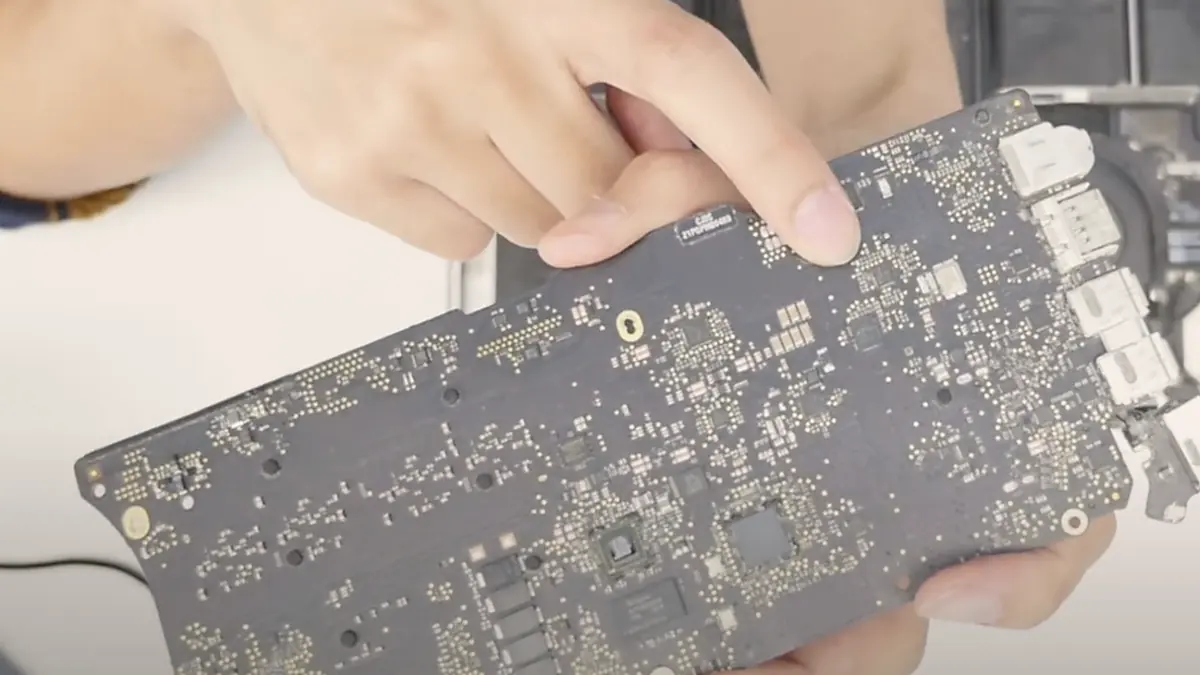
A MacBook that will not power on, will not charge or shows no backlight is seldom a write-off. We read the logic board on a current-limited bench supply, trace the failure to the exact component under a microscope, and microsolder it — rather than quoting you the price of a whole replacement board.
A slice of this week's logic board bench log
On this page
What MacBook logic board repair really means
Apple calls the main circuit board inside your MacBook the logic board, and it is where every other part connects. It carries the processor — an Intel chip on older machines, or Apple's own M1, M2, M3 or M4 silicon on current ones — along with the memory, the power-delivery stages that convert your charger's voltage into the many rails the system needs, the charging controller, the SMC that supervises power and startup, the input-output circuitry, and on some models a security element or, on the 15-inch Pro, a discrete graphics chip. We service the full range: MacBook Air and MacBook Pro, Intel and Apple silicon, and the older Retina and Intel machines with a discrete GPU. When a MacBook is described as "dead", the failure nearly always lives on this one board, and nearly always in a single identifiable spot rather than across the whole assembly.
Faced with a board fault, a shop can go one of two ways. The common route in Singapore is to declare the logic board faulty, source a replacement, and bill you for the entire assembly — fast, tidy and enormously profitable, and the reason owners are so often told a four-figure board is finished when the true fault is a component worth a couple of dollars. The route we take is component-level microsoldering: isolate the one part that failed and replace only that. It calls for a schematic, a boardview, a stereo microscope and the discipline to lift and refit parts without cooking the board around them. It is slower and more demanding, and it is what saves you most of the cost. For the wider picture of what we replace across a MacBook, see our MacBook repair overview.
The symptoms that point to a logic board fault
MacBook board faults tend to present in a handful of recognisable ways. No single symptom is a diagnosis on its own, but each one narrows the search sharply before the machine is ever opened:
- No power at all. No chime, no fan, no glow from the display when you press the key or open the lid. This is the classic board presentation — often a shorted rail, a fault on the main PPBUS power bus, or an SMC that is not sequencing the board up.
- No backlight, faint image under a torch. If a ghost of the desktop is visible under a bright light but the screen stays dark, the panel is fine and the backlight circuit on the board has failed — a blown backlight fuse, a failed backlight diode, or the driver IC. This is a signature fault on Intel Retina models.
- Will not charge, or charges only sometimes. The battery reads "not charging", or only takes a charge at certain cable angles. On USB-C machines this is power-delivery negotiation or the CD3215 charging IC; on older models it is the Tristar or U2 controller, or the SMC.
- No display and no boot. A power light or fan, but nothing on the screen and no startup. This points at the rails, the SMC, or on Intel silicon a solder or memory fault.
- Kernel panics and random restarts. The machine boots but throws panics or shuts down under load — often a degrading power stage or a marginal component on the board rather than software.
- Graphical artefacts before a black screen. Coloured blocks or corruption that worsen over weeks, then no image — on a 15-inch discrete-GPU Pro this is the graphics chip losing solder-ball contact.
If your MacBook matches one of these, send us a two-line description and a photo before you make the trip; we can usually give you a probable cause and an honest price band from the symptom alone.
Common MacBook logic board faults, and what causes them
Below is the bench reference our technicians use during intake. The codes are ours, not an Apple or industry standard — quoting one over WhatsApp simply lets us free the right bench and lay out the right tools before you arrive. Turnaround assumes the fault behaves the way the symptom suggests; a board fault we have not yet traced is never put on a fixed schedule.

Diagnostic reference
MacBook logic board fault reference
The faults behind most logic board repairs on our bench, in roughly the order we see them across Air, Pro, Intel and Apple silicon.
Tell us the symptom. We will tell you the likely cause.
Send a photo and a two-line description of what your MacBook does. A technician replies with a probable diagnosis and an honest price band before you leave the house.
Our MacBook logic board repair process, step by step
Every board that reaches our bench follows the same disciplined path. A fixed process exists so that nothing is skipped and nothing is guessed — a MacBook board rewards patience and punishes shortcuts. Our documented MacBook board repair procedure sits behind every job.
- Data question first. Before any tool touches the board we establish what matters on the storage, because on Apple silicon and T2 machines the storage is bound to the board. If your files are important, we discuss data recovery options up front rather than after.
- Symptom capture and history. What the machine does, when it started, and what happened just before — a spill, a drop, a third-party charger, a failed update. History often narrows a board fault faster than any instrument.
- Bench power-supply current reading. The board goes onto a bench supply at its rated input with the current limit clamped low. What it draws in the first second tells us most of the story: zero draw means an open power path, high draw means a shorted rail, and normal standby with no boot means a rail is not sequencing.
- Thermal and microscope inspection. On a shorted board we freeze-spray or use a thermal camera to find the part warming up — usually a single ceramic capacitor. Under the stereo microscope at 20–40× we look for corrosion, lifted pads, cracked joints and cold-cracked components, and we photograph what we find.
- Schematic and boardview tracing. Where the fault is not a simple short, we go to the schematic and boardview for that model and probe the enable and power-good lines in order until the failing stage reveals itself.
- Microsoldering rework. The board bench runs a preheater, a hot-air station with controlled airflow, a microscope and low-temperature solder for delicate work. Shorted components are removed and replaced, broken traces are jumpered with enamelled wire, corroded pads are cleaned back to copper and re-tinned, and BGA chips are reballed where contact is genuinely lost.
- Bench-test, then soak-test. The repaired board is powered and verified on the bench before it returns to the chassis, then the assembled MacBook is load- and soak-tested — at least 24 hours for liquid-damage boards — before it is handed back with a written warranty on the job sheet.
Two honest limits sit at the front of every quote. First, a board with catastrophic physical damage — a snapped PCB, a torn connector footprint, a delaminated CPU package — is often beyond economical repair, and we say so on day one rather than after you have paid. Second, and specific to MacBooks: because Apple silicon pairs the storage and the security element to the board, and late Intel machines do the same through the T2 chip, replacing a board can mean the SSD data cannot be read afterwards. That makes the data question part of the quote, not an afterthought, and we raise it before we begin.
Board-level repair versus "reflow": why the distinction matters
When a 15-inch Pro develops graphical artefacts and then loses its display, the usual cause is a discrete graphics chip whose solder balls have fatigued and lost contact after years of heating and cooling. There are two responses, and only one is a genuine repair. A reflow simply heats the board until the old solder softens and, with luck, re-seats the cracked joint. It can revive a machine for a few weeks, which is why some shops sell it — but the underlying solder is still fatigued, it will fail again, usually worse, and the added heat makes the eventual proper repair harder. Proper board-level microsoldering is the real answer: on a true solder-ball failure we reball the chip with a fresh, uniform set of balls and new underfill for mechanical support; on a component fault we replace the failed part outright. That is the only graphics-level repair we will put our name to, and we will tell you honestly when a reball is not worth doing against the value of the machine — a truthful "replace it" is part of the service.
Preventive tips: how to keep the logic board healthy
Most of the boards we repair failed for reasons that were, in hindsight, avoidable. A few habits meaningfully extend a logic board's life in Singapore's heat and humidity:
- Keep liquids away from the keyboard. A spill is the single most destructive thing that happens to a MacBook board, and the damage is progressive. If it happens, hold the power key to shut down, do not switch it back on to "check", and bring it in the same day rather than waiting for it to dry.
- Do not let the machine bake. Heat ages solder joints and capacitors. A MacBook that runs hot and loud with a clogged fan is cooking its own board; keeping the vents clear and servicing the cooling is cheap insurance against an expensive board fault later.
- Use a genuine or reputable charger. Cheap USB-C adapters deliver dirty power and stress the power-delivery front end, the charging IC and the port. Use the correct wattage and plug in gently rather than at an angle.
- Protect against surges. A surge-protected outlet costs little and shields the charging circuit from spikes that can take out the CD3215 or the input protection.
- Treat FlexGate and small faults early. A display that dims at the hinge, an intermittent port or a ticking fan is the machine telling you something. On 2016–2017 Pros the display cable is a known issue — see our FlexGate repair — and small faults caught early rarely become board-level ones.
- Back up regularly. Because the SSD is bound to the board on modern MacBooks, a healthy Time Machine or cloud backup turns a worst-case board failure from a catastrophe into an inconvenience.
Why customers trust us with a logic board repair
Because we show you the fault under the microscope and photograph it. Because the quote is written before any rework starts and does not change afterwards. Because every completed repair carries a written warranty on parts and workmanship, and if we cannot fix it you do not pay a repair fee. And because a MacBook board is the one repair where honesty is worth more than the margin on an unnecessary part — telling you the truth about your machine, including the data caveat and the times a board is not worth saving, is the whole basis of the trade we have built over fourteen years. If your machine is a Windows laptop rather than a Mac, the same bench handles laptop motherboard repair too, and for every Apple device we keep one Apple repair workflow.
Verified Google reviews
MacBook board repairs, in customers' words
Every review below is a real, unedited review from our Google profile, shown with the customer’s name as they left it. Read all 940+ on Google.
Nash and Melissa were super accommodating and helped me on an urgent repair of a motherboard failed MacBook Pro! Saved me so much time! Appreciate the helps!
I had MacBook motherboard water damage during my mandatory SHN, a very stressful situation. iDevice Repair helped me to get up and running in less than a week, during the holiday season, and even arranging for delivery of my MacBook since I was located 5 minutes away.
I have brought my Macbook Pro to them to fix my water damage. They are very responsive and the price is much more affordable than apple. I am glad to have my motherboard fixed. Thanks for the service. It took around 1 week, which is quite fast. Thanks for the service
Related services
Work we do on the same bench
MacBook motherboard repair
The full microsoldering procedure behind every board we take on, documented step by step.
See the service →Laptop motherboard repair
Component-level board repair for Windows laptops — no-power, no-POST, charging and GPU faults.
See the service →Data recovery
Imaged first on write-blocked hardware, and vital when a board fault threatens bound storage.
See the service →Questions we get every week
MacBook logic board repair questions, answered
How much does MacBook logic board repair cost in Singapore?
We price logic board work by the bench time it takes to trace and rework the fault, not by the value of the whole board, because the real culprit is usually one tiny component that costs a few dollars. A quickly located fault — a shorted capacitor, a blown backlight fuse, a single failed charging IC — usually lands in the low-to-mid hundreds. An intermittent fault chased across a boardview, a corrosion recovery after a spill, or a reball on a discrete-GPU 15-inch Pro sits higher because it takes far longer on the bench. We read the board on a current-limited supply first and give you a written quote you approve before any rework begins.
Is a logic board repair worth it, or should I just replace the board?
Repairing the fault is almost always the better value. A replacement Apple logic board is one of the most expensive parts in the machine, has to be sourced, and on Apple silicon it does not carry your storage across — yet the actual fault is normally a single failed component on an otherwise healthy board. That is the whole case for component-level microsoldering: we fix the few-dollar cause rather than sell you the assembly wrapped around it. When a board really is beyond economical repair, we tell you at intake instead of after you have paid.
Will I lose my data if you repair or replace the logic board?
This is the honest caveat we raise before anything else on a MacBook. Apple silicon machines, and late Intel models with a T2 chip, tie the storage to the board's Secure Enclave, so if the storage controller or the security element is the failed part, a board swap can leave the SSD unreadable. On a fault we can microsolder we usually keep everything intact, but we always treat the data question first. Where data matters, we discuss imaging and data recovery before we touch the board, never after.
My MacBook has no backlight but I can see the screen with a torch. Is that the board?
Usually yes, and it is one of the most common board faults we see, especially on Intel Retina models. If a faint image is visible under a bright light but the backlight stays dark, the panel and the graphics are fine and the failed part is on the board's backlight circuit — a blown backlight fuse, a failed backlight diode, or the backlight driver IC. It is a classic component-level repair rather than a screen replacement, and being sold a whole display for a no-backlight fault is exactly the kind of upsell component work avoids.
My MacBook will not charge. Does that always mean a new board?
No. A MacBook that will not charge is usually a charging-circuit fault, not a dead board. On USB-C models the power-delivery negotiation and the CD3215 charging IC are frequent culprits; on older MagSafe and early USB-C machines it is often the U2 or Tristar charging controller or the SMC; and a worn port or a bad charger can mimic all of it. We put the board on a bench supply and watch what it draws when a charger is presented — that current signature tells us whether the fault is the port, the charging IC or the power path, and it is almost always a repairable component.
Can you repair a MacBook logic board after a liquid spill?
Yes, and speed matters more than anything. Liquid rarely kills a MacBook board in one moment; it corrodes progressively through electrochemical action that keeps eating traces and pads for days, which is why a machine can seem fine and then fail a week later. We disassemble fully, disconnect the battery, clean the board ultrasonically, clear corrosion back to clean copper, re-tin pads, jumper broken traces under the microscope, and replace any shorted components — then power the board on a bench supply and soak-test it before it goes back into the chassis. Brought in the same day the odds are strong; after a week of intermittent use they drop sharply.
Do you do reflow, and is that a real fix for a MacBook GPU fault?
We do not sell reflow as a lasting repair, because it is not one. A reflow just heats the board until the old solder softens and, with luck, re-seats a cracked joint under a chip such as the discrete GPU on a 15-inch Pro — the fatigued solder is still there, it will fail again, and the extra heat makes the proper repair harder later. The real fix is board-level microsoldering: on a genuine solder-ball failure we reball the chip with fresh solder and new underfill, and on component faults we replace the failed part outright. We will also tell you honestly when a reball is not worth doing against the value of the machine.
Bring the MacBook in, or send us a photo first
Walk-ins welcome from the CBD, Orchard, Novena, Toa Payoh, Bishan, Ang Mo Kio, Jurong East, Clementi, Tampines, Bedok, Woodlands, Yishun, Hougang and Punggol. Courier collection islandwide for machines that should not be moved.