
★★★★★
Great service - MacBook froze on upgrade. Could not solve problem myself. iDevice expedited the repairs and my Mac is like new! Very reasonable rates for repair too. Highly recommend.
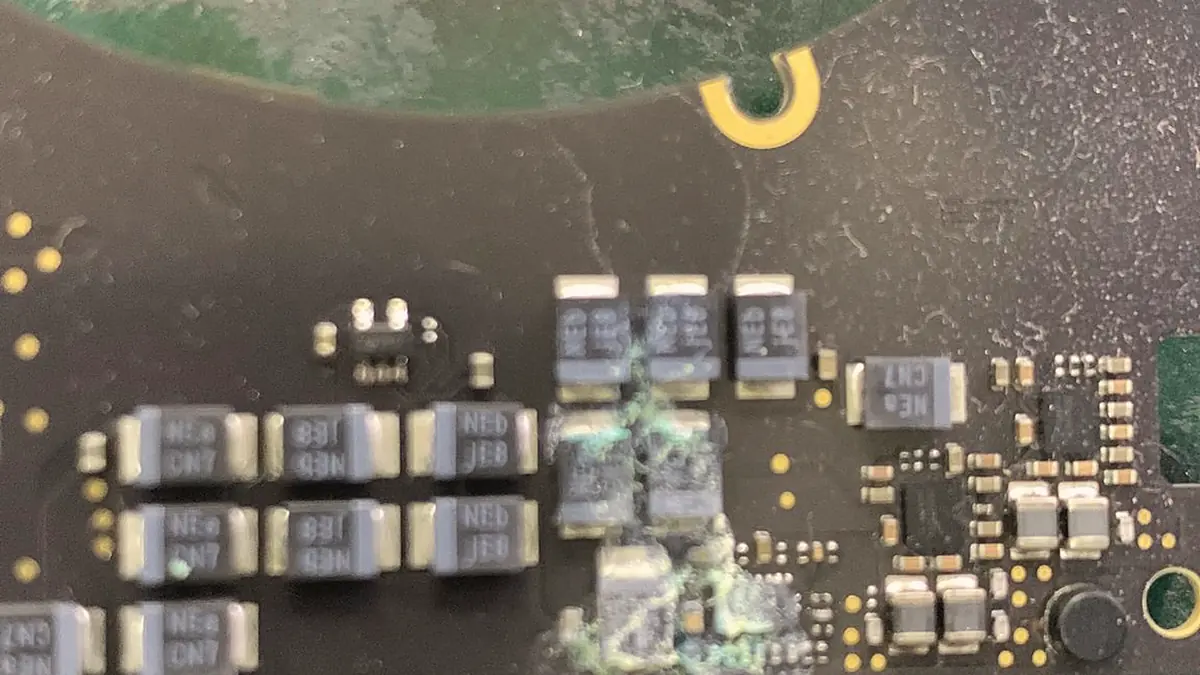
Before anyone condemns an iMac logic board, the power supply, the panel and the backlight circuit all have to be eliminated. Most of the time, one of them is the fault.
Board-level iMac repair runs from around S$120 to S$800, typically 3–7 days, case by case. Diagnosis is free on walk-ins, you get a written quote before any work starts, and if we cannot fix it you do not pay a repair fee. See how we arrive at that.
An iMac that shows no sign of life has four candidates, and the logic board is the expensive one and the least likely. The power supply is first: it is a separate board, it ages, and its capacitors fail. The backlight circuit is second: an image that is visible under a torch means the machine is running perfectly and only the backlight is dead. The panel is third. The logic board is fourth.
A workshop that starts at the logic board is optimising for its own invoice. The correct order costs us diagnostic time and usually costs you less money, which is why the diagnosis is free and the quote comes after it.
Diagnostic reference
The logic board is the last suspect, not the first. The power supply is the first.
An iMac is not built like a laptop. There is no external power brick and no battery in the middle of the circuit; instead a full mains power supply lives inside the chassis on its own board, and it is the single component most likely to fail on a dead machine. When an iMac shows no light, no fan and no chime, the first job on the bench is to decide whether the supply is delivering its rails or whether the logic board is refusing to power on. Getting that decision right is the difference between a modest repair and an unnecessary one.
We start with the standby rail. With the machine on the bench and a multimeter across the supply's output, a healthy unit holds a steady standby voltage the moment it is plugged in, before the power button is ever pressed. A supply that reads zero, sags under the smallest load, or climbs and collapses is the fault, and it is a separate board from the logic board — often repairable at component level itself, sometimes replaced as a unit. Only when the supply is proven good, delivering its main rail cleanly and holding it under load, do we turn our attention to the logic board and the rails it is meant to generate from that input. On a 27-inch machine we also check the LED backlight supply lines that run off the power board, because a dead backlight and a dead machine can look identical from the front until you meter them apart.
This ordering is deliberate and it is honest. A workshop that condemns the logic board without first clearing the internal supply is guessing, and guessing on an all-in-one is expensive for the owner. The bench supply and the multimeter answer the question in minutes, and that answer is part of the free diagnosis.
The hard economics of an iMac are what make component-level repair worth the patience. In a laptop, a dead board leaves you weighing the repair against a replacement laptop. In an iMac, a dead board threatens the panel, the stand, the speakers, the camera and the whole chassis at once, because they are all fixed to the machine the failed board sits in. A 21.5-inch or 27-inch Retina 5K panel is one of the finest displays Apple has ever shipped and it is expensive to replace on its own — as our iMac parts replacement service can attest — so throwing it away to avoid a rail-level repair rarely makes sense. Fixing the twenty-cent component that actually failed keeps a screen worth many hundreds of dollars in service, and it keeps your serial number and your data intact. That is the argument for board-level work in one sentence, and it is why we would rather trace a fault than sell you a replacement.
Power rails. The board generates a family of voltages from the supply's main rail. A shorted capacitor on any of them takes the whole machine down. Found the same way as on any other board: limited current in, thermal camera on, watch for the component that heats.
Backlight drivers. A boost converter, a coil, a diode, a fuse. Faint image under a torch, no backlight. One of the most satisfying repairs there is, because the machine goes from apparently dead to perfect.
GPU faults. Artefacts on screen, no display over the internal panel but a working external output, or a machine that will not complete a boot. On boards with a discrete GPU this is often solder-ball fatigue under the package, and it is fixed properly by reballing, not by heating the board until the joints reflow temporarily.
Liquid. Rare on an iMac and always ugly when it happens, because the liquid arrives through the top vent and runs down across everything.
On Intel iMacs with a T2 chip, and on all Apple silicon iMacs, the storage is soldered to the logic board and encrypted to it. Repairing the board in place is the only path that keeps your data. If the board is beyond repair, the data is gone — not gone in the sense that a specialist could recover it, gone in the sense that the encryption key was in the chip that failed.
This is a design decision by Apple with real security benefits, and it means your backup strategy is the only thing standing between you and total loss. We would rather tell you that now than at the counter.
Fault by fault
Each of these is a specific circuit with a specific investigation. None of them is a reason to condemn the whole board.
The logic board turns the supply's main rail into a family of lower voltages. One shorted ceramic capacitor drags a rail to ground and the machine will not start. We feed limited current in and watch the thermal camera for the part that heats, then remove and replace just that component.
Fan spins but nothing else happens. This points at a core power rail that will not sequence, the CPU circuit, or a failed regulator that has to come up before the machine can post. We probe the enable and power-good lines in order against the boardview until the stalled stage shows itself.
A faint image under a torch with no backlight is a dead boost converter, its coil, its diode, or a blown backlight fuse. It is one of the most satisfying board repairs there is, because the machine goes from apparently dead to perfect once the driver is restored.
Artefacts on screen, or no internal display with a working external output, points at a discrete GPU that has lost solder-ball contact. Done properly this is a reball with the correct thermal profile and fresh underfill, not a reflow. We are honest that some GPU packages are past economical repair.
A machine that boots then cuts out under load is usually a weak power stage: a failing MOSFET, a tired VRM capacitor, or a thermal fault making a regulator fold back. We reproduce the load on the bench and find the stage that gives way before we replace anything.
The system management controller supervises how the board wakes and orders its rails. When sequencing goes wrong the machine can sit half-alive, restart in a loop, or never chime. We trace the sequence stage by stage rather than swap the board on a hunch.
The 27-inch iMac has user-accessible memory slots behind a hatch, and those slots and their traces are part of the logic board. A machine that refuses to post, or posts with less memory than is fitted, is not always bad RAM — a cracked joint on a slot, a bent pin, or a damaged trace between the slot and the controller behaves the same way. We test with known-good modules first, then inspect the slot and its traces under the microscope before deciding whether the fault is the memory or the board it plugs into. On the slimline 21.5-inch models where memory is soldered down, there is no slot to blame and the investigation moves straight to the board.
Liquid damage is rarer on an iMac than on a laptop because there is no keyboard over the board, but when it happens it is ugly: the liquid enters through the top vents and runs down across the board, spreading corrosion wherever it settles. Even without a spill, the local climate works against these machines. Singapore humidity and the fine dust that a desktop fan pulls in for years form a conductive film on a board that runs warm, and over time that film promotes corrosion and leakage on fine-pitch components. A machine that lives in an un-aircon room, near a kitchen, or in a dusty HDB corridor ages its board faster than one on a clean, cool desk. We clean corrosion back to bright copper, re-tin the affected pads and jumper any trace the corrosion has eaten before we call the repair done.
How the repair runs
We record what happened and when. A device that was dropped, a device that met liquid and a device that simply stopped are three different investigations.
Visual inspection, power draw on the bench supply, and board inspection under the microscope where the symptom points at the board.
You get the fault, the proposed fix and the price. Nothing is opened further, and nothing is ordered, until you say yes.
ESD-controlled bench, grounded mat, battery isolated before any connector is touched. Board-level work is done under the scope with hot air and a soldering iron, not by swapping.
We reproduce the conditions that caused the fault and confirm it is gone, then run the device under load before it goes back in its box.
Terms printed on the job sheet. Old parts returned on request where they are not exchange units.
Behind the six steps above sits a fixed technical workflow, and it runs in the same order on every board because a board rewards method and punishes guessing. It starts with the eye and ends, only where it must, with the hot-air station.
Visual inspection first. Before anything is powered, the board comes out and goes under good light. Burn marks, bulged or vented capacitors, corrosion, a cracked component or a scorched connector often name the fault before an instrument is touched. We photograph what we find so you can see it too.
Microscope for the fine detail. At 20 to 40 times magnification the things that matter on a modern board become visible: a hairline crack in a solder joint, a lifted pad, a whisker of corrosion bridging two pins, a component that has cold-cracked. This is detail that simply cannot be judged at arm’s length, and it is where most real faults are confirmed.
Bench supply and thermal camera. The board goes onto a bench power supply at its rated input with the current limit clamped low. The current it draws in the first second tells most of the story — zero draw is an open path, high draw is a short, normal standby with no boot is a sequencing fault. On a shorted board a thermal camera or a little freeze spray finds the component heating up, and nine times in ten it is a single part.
Schematic and boardview. Where the fault is not a simple short, we read the board’s own schematic and boardview and probe the enable and power-good lines in sequence until the failing stage reveals itself. This is the difference between repairing a board and swapping one: we follow the design to the fault rather than replacing parts and hoping.
Reballing, only when it is the right answer. When a GPU or another BGA package has genuinely lost solder-ball contact, the correct repair is a reball: the chip comes off, the old solder is cleaned away, a fresh uniform set of balls goes on with new underfill, and it is refitted at a controlled thermal profile. We do not sell a reflow — heating the board until the joints soften — as a lasting repair, because it fails again and makes the proper fix harder.
Most iMac board faults we take in are fixable, and the common ones — a shorted rail, a dead backlight driver, a failed power stage — carry strong odds because the fault is local and the fix is a component. Liquid boards are more variable: brought in the same day the odds are good, but a board that has sat corroding for a week, or that has been powered on repeatedly while wet, is a harder recovery and we say so before we start. Two categories are honestly beyond economical repair often enough to name them. Some GPU packages are so degraded, or so scarce, that a reball is not worth doing against the value of an older machine. And a failed T2 or Apple silicon board where the fault sits in the storage or the security element cannot be brought back with your data, because the encryption key lived on the chip that died — the limits of which we explain in our data recovery in Singapore service. When your machine is in one of those situations we tell you on day one, not after you have paid, and if we cannot fix it you do not pay a repair fee.
The bench work happens at our workshop at 6 Harper Road, Leong Huat Building, a short walk from Lavender MRT and easy to reach from the CBD, Kallang and the city fringe. Most customers drop the machine off in person so we can capture the symptom and the history at the counter; for an iMac that is awkward to move, islandwide courier collection is available. Walk-in diagnosis is free, the written quote comes before any work, and nothing is opened further or ordered until you approve it. Board-level work is done on an ESD-controlled bench with a grounded mat and the power isolated before any connector is touched, under the microscope with hot air and a soldering iron rather than by swapping assemblies. Every completed repair leaves with a written warranty on parts and labour printed on the job sheet. We are an independent repair centre and are not affiliated with or authorised by Apple; that independence — weighed honestly in our guide to third-party versus Apple repair in Singapore — is exactly what lets us repair a board Apple’s own process would replace. The same component-level discipline runs across our Apple repair bench and our MacBook logic board repair service.
Related services
Panels, drives, SSD upgrades, fans and power supplies.
See the service →The same component-level work on Apple's laptops.
See the service →Soldered storage, T2 encryption and what is actually recoverable.
See the service →Verified Google reviews
Real reviews from our Google profile, shown with the customer’s name as they left it. The score and the count are Google’s own, updated every week.
Great service - MacBook froze on upgrade. Could not solve problem myself. iDevice expedited the repairs and my Mac is like new! Very reasonable rates for repair too. Highly recommend.
In just a few hours solved problems with my Mac that the Apple Store on London UK said could not be done. They advised me to buy a new computer. Dean has got it back to nearly new again for a fraction of the cost. Thanks
Manage to fix my iPad mini screen as well as the home button with minimal cost incurred compared to Apple Store. It was a very disappointing with Apple Store that they only cares about selling new products to consumers. At least in here, the staffs help you to save either your iPad, iPhone or even Mac book. Thumb up for them!!
Great time changing mac battery. Staff were very friendly and very helpful!
Great service as always, we are repeated customers. Came here to fix my imac and also to change my dell laptop battery.
Superb! I went to Apple store but they told me to get whole unit replacement, but I got mine fixed asap here for i only a third of the price LOL!
Repaired my mac book pro 2015 due to some battery bloating issue. Replies are fast and service is professional. Definitely would recommend.
Sent my mac for battery and speakers replacement. Prices and services are great!
Questions we get every week
Diagnostics first, quote second, repair third — and you decide between each one. Bring it in, or send a photo and we will tell you what we think it is.