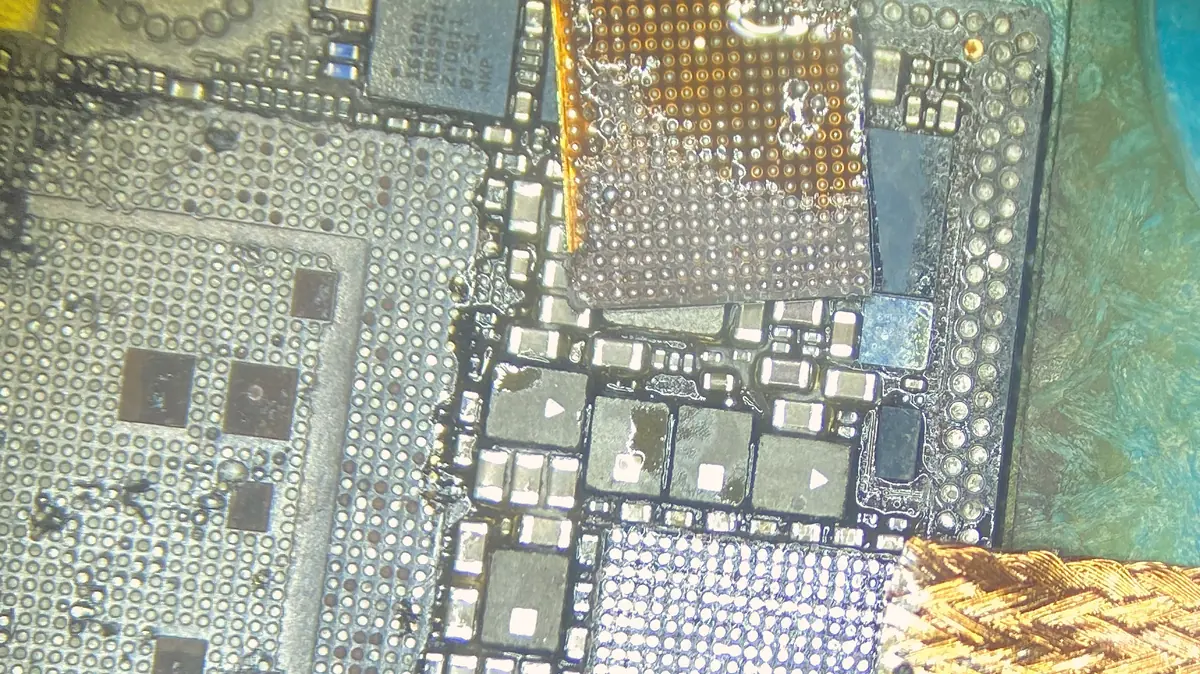
The circuits behind each fault, in plain terms
An iPhone logic board is not a single thing that "dies". It is a stack of small circuits, each responsible for one job, packed onto a board the size of a stick of gum with the important chips hidden under metal shields and layers of shielding cans. When one circuit fails, everything downstream of it stops, and the phone looks completely dead even though ninety-nine per cent of the board is healthy. Knowing which circuit is at fault is the whole game, so it is worth understanding the handful that fail most often.
The charging circuit — Tristar and Tigris. Two chips govern charging on modern iPhones. The USB interface controller, known to technicians as Tristar or U2, negotiates with the charger and enables charging; the power converter, often called Tigris, does the actual heavy lifting of moving current into the battery. A worn or liquid-stung charging port, or a spell on a cheap non-compliant cable, can take out U2 and leave the phone reporting that it is charging while the battery never moves. This is one of the most common board repairs we do, and on many models it is a same-week fix once the faulty chip is confirmed.
The backlight circuit. If the phone rings, gets messages and shows a very faint image under a bright torch but the screen is otherwise black, the display itself is usually fine — the backlight boost circuit on the board has failed. It is a small chain: a driver line out of the main processor, a boost coil, a diode and a backlight filter, and a fuse that very often takes the hit first when a screen is changed carelessly or a connector is seated while the phone is powered. It is also the fault most frequently misdiagnosed elsewhere as a "dead screen" and quoted as a full display replacement it does not need.
The touch circuit. A screen that shows a perfect image but ignores your finger, or registers phantom taps and ghost-typing, is often a touch problem on the board rather than in the glass. The touch controller and its supporting circuitry can be damaged by drops that flex the board or by liquid. Where the fault is genuinely the on-board touch IC and not the panel, replacing the screen alone will not fix it — and we would rather tell you that before you buy a screen you do not need.
The audio circuit. A greyed-out volume slider, a speaker or microphone that has gone silent, or the phone freezing on calls points at the audio IC and its surrounding components. On some models this chip sits where board flex from a drop stresses its solder joints over time, so the fault can appear months after the drop that caused it. It is a delicate microsoldering job under the scope, not a parts swap. Before assuming the board, though, rule out the cheap causes first — iPhone sound not working covers the settings and the blocked speaker grille that explain most silent iPhones.
The baseband. No signal at all, a permanent "Searching…", or an IMEI that has reset to a string of zeros points at the baseband processor, its dedicated power rail, or the RF and antenna circuits around it. Some of this is straightforwardly repairable; baseband chip work itself is realistic on certain models and effectively uneconomic on others, and we say which before quoting rather than after.
Storage — the NAND. The flash storage is a chip soldered to the board, and it holds everything: photos, messages, app data. A phone stuck on the Apple logo after a restore, or one that reports far less storage than it should, can be a failing NAND or a cracked solder joint beneath it. This is the fault where repair and data recovery become the same conversation, covered below.
Water damage, corrosion and why speed matters in Singapore
Liquid rarely kills an iPhone board the instant it gets in. What it starts is electrochemical corrosion — a slow chemical reaction, powered by the board's own voltages, that eats through pads, traces and the tiny legs of chips over days and weeks. In Singapore's humidity the process does not politely stop once the phone "feels dry"; moisture trapped under the shields keeps it going. That is why a phone that survived a pool or a spilt drink can work for a fortnight and then fail for good, and why the single best thing you can do is power it off and bring it in early rather than leaving it in a bag of rice.
Our liquid procedure is deliberate. The board comes out, the battery is isolated, and the board is cleaned — ultrasonically where appropriate — to lift corrosion out of places a brush cannot reach. Corroded pads are cleaned back to bare copper and re-tinned, lifted or eaten-through traces are jumpered under the microscope with fine enamelled wire, and any component the liquid has shorted or destroyed is replaced. Only then does the board go back on the bench supply for testing. We are honest that liquid jobs carry the widest range of outcomes of anything we do: caught early, many are fully recovered; left for weeks of intermittent use, corrosion can reach a point where the board is beyond economical repair, and we will tell you that on day one rather than bill you for a fight we cannot win.
When the board cannot be saved but the data must be
The reason board repair matters more on a phone than on almost any other device is the soldered storage. On a laptop you can usually pull the drive and read it elsewhere; on an iPhone the NAND is bonded to the same board that has failed, and it is paired to the processor for security, so a routine "just move the chip to a new phone" does not work. Repairing the original board in place is the only clean route that keeps your photos and messages intact, which is exactly why replacing the whole unit — the authorised answer — means losing everything that was not backed up.
Where a board genuinely cannot be brought back, recovery is sometimes still possible: careful NAND work and transfer to a matched donor board can, on some faults, pull the data off even when the phone will never switch on again. It is specialist, it is not guaranteed, and it belongs to our data recovery service rather than a standard repair. If your phone holds something irreplaceable, say so at intake — it changes how carefully we handle every step, because the first rule of recovery is to do nothing that makes the data harder to reach.
Why repairing the board beats replacing the phone
A whole-unit replacement swaps out a board that is, in the vast majority of cases, ninety-nine per cent healthy. You pay the price of the entire assembly to solve a fault that lives in one twenty-cent component, and you lose your data in the bargain. Component-level repair inverts that: we find the one part that failed and replace only it, which is almost always cheaper than a new board and always keeps the storage — and everything on it — exactly where it was.
There is an environmental argument too. A phone written off for a failed backlight fuse or a dead charging chip is a working device sent to a drawer or a bin over a few dollars of parts. Board repair keeps it in service. We are not against replacement when it is genuinely the right call — a board with catastrophic physical or liquid damage can cost more to chase than the phone is worth, and we will say so plainly — but "the board is dead, buy a new phone" should be the last answer after a proper diagnosis, not the first answer instead of one.
How the diagnosis actually works on the bench
Good board work is mostly good diagnosis; the soldering is the easy part once you know exactly what to change. Every board we take on runs the same disciplined sequence, and none of it can be done from a photo or over the phone, which is why we quote only after we have read the board.
Visual inspection first. Before any power is applied, the board is examined under the microscope for the obvious tells — corrosion residue, lifted or missing components, cracked joints, tell-tale burn marks — and photographed. A great many faults are visible here to a trained eye and never need deeper probing.
Current on a bench supply. The board goes on a regulated supply and we watch what it draws. Nothing at all points to an open circuit or a blown fuse; a heavy immediate draw points to a short. That one reading splits faults that look identical from the outside into completely different repairs, and it is the single most useful measurement on the bench.
Thermal and freeze detection. On a shorted board, a thermal camera or a drop of isopropyl over the suspect area finds the component heating up in seconds — usually a single failed capacitor giving itself away.
Schematic and boardview. Where the fault is not a simple short, we work from the schematic and boardview for that exact model, probing enable and power-good lines stage by stage until the circuit that is not doing its job reveals itself.
Rework and, where needed, reballing. The confirmed faulty part is removed and replaced under the scope with hot air and a fine iron. Where a chip such as the NAND or processor has lost contact through fractured solder balls, it is reballed — lifted, cleaned, fitted with a fresh, even set of balls and refitted — not simply reheated in the hope the old joints re-seat. A reheat can revive a board for a few weeks; it is not a repair, and we do not sell it as one.
What we can and cannot promise
Honest success rates matter more than a confident sales pitch, so here is the truthful shape of it. Clean electrical faults found on the bench — a shorted rail capacitor, a charging IC, a backlight circuit, a display or touch line — are the bread and butter of board repair and carry high success rates; if we cannot fix one of these, you do not pay a repair fee. Baseband faults are model-dependent and we set expectations before we start. Severe liquid damage sits at the wide, uncertain end: some boards come back fully, some are beyond saving, and no honest workshop can promise which yours will be until it has been opened and cleaned. Certain NAND faults are similar — recoverable on good days, genuinely beyond economical repair on bad ones. What we promise is not that every board can be saved. It is that we will tell you the truth about yours, in writing, before you spend anything.
What to expect at the 6 Harper Road workshop
We work from 6 Harper Road, in the Leong Huat Building at #05-02, a few minutes on foot from Tai Seng MRT on the Circle Line and easy to reach from Paya Lebar, Ubi, Geylang and, with one change at Paya Lebar, the CBD and the rest of the central belt. Walk-ins are welcome during opening hours and the first-line diagnosis is free — you are not committed to anything by bringing the phone in. If it is a busy day we will take your symptom and history, put the board on the bench when a station frees up, and message you with what we find and a firm written quote before any rework begins.
You approve the price before we touch the board, every completed repair carries a written warranty on parts and labour, and if we cannot fix the fault you do not pay a repair fee. Customers across the island send phones in by courier as well; if yours is somewhere like Jurong, Tampines, Woodlands or Punggol and a trip into town is awkward, message us first and we will talk you through safe packing. Whichever way it reaches us, the sequence is the same — diagnose, quote, get your approval, repair, test — and you decide at every step. If you are not yet sure the fault is even on the board, start with our iPhone repair overview or the general phone repair service, and we will point you the right way. For Apple devices beyond the iPhone, everything runs through the same bench at our Apple repair centre, and the wider iDevice Resource Centre collects our written guides in one place.