
Apple · every device
Apple repair in Singapore — the independent service centre
We are not an Apple Authorised Service Provider, and there are times we will tell you to go to one. Here is how to decide.
Looking for the price? The price guide for this page is further down — jump straight to it ↓. Diagnosis is free on a walk-in, you get the price in writing before any work starts, and if we cannot fix it you do not pay a repair fee.
On this page
- What Apple repair costs in Singapore
- When to go to Apple, and when to come to us
- Apple faults across the range
- What component-level repair means
- Common Apple repairs, device by device
- Genuine, aftermarket and the honest trade-off
- Apple-specific things to check before you hand it over
- Protecting your data during an Apple repair
- At the workshop: 6 Harper Road
- Apple repair FAQs
When to go to Apple, and when to come to us
This ought to be the first section on every independent repair page in Singapore, and it almost never is. Go to Apple if your device is under warranty or AppleCare+, if it is subject to an active service programme, or if you need the repair recorded against the serial number for a corporate asset register. Nothing we can offer beats a free repair, and independent work will end your warranty.
Come to us when the device is out of warranty and the authorised answer is a whole-unit replacement or a board swap; when the data on the device is not backed up and matters; when the fault is liquid damage, which authorised centres do not repair; or when you want the fault diagnosed and explained rather than the assembly replaced.
Diagnostic reference
Apple faults across the range
Different devices, one bench. Every one of these is diagnosed before it is priced.
What component-level repair means for an Apple device
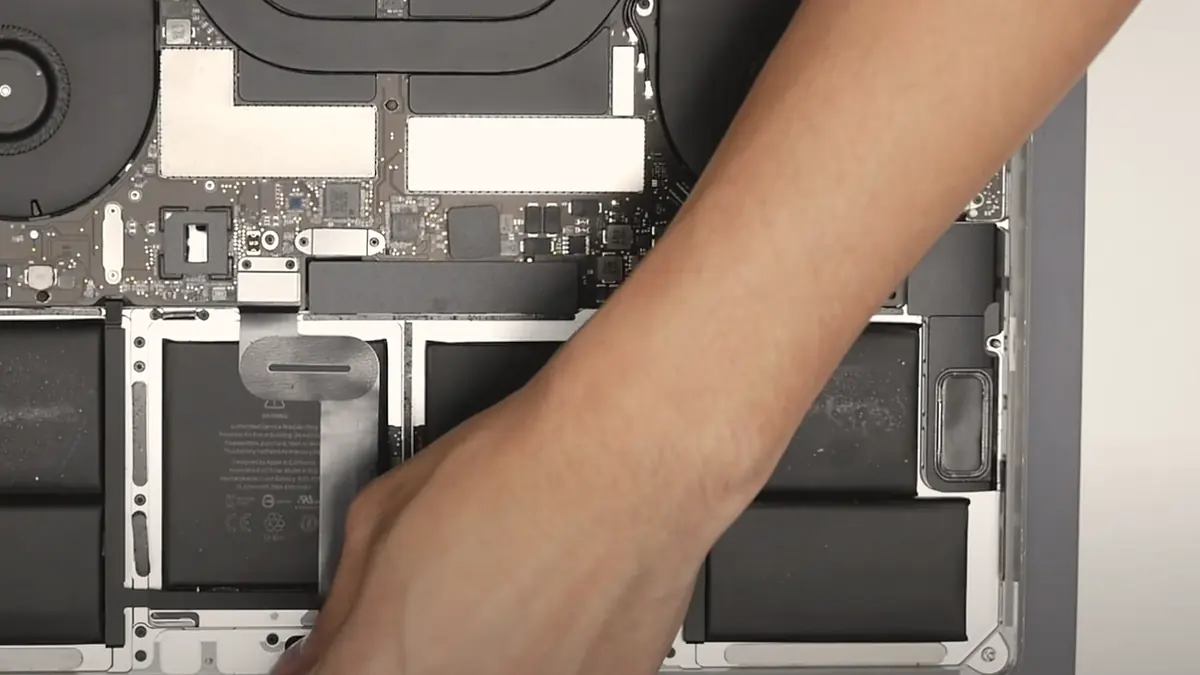
Apple's service model replaces modules. A fault anywhere on a logic board means a new logic board, and on modern devices the storage is soldered to that board. The process is fast, safe and consistent, and it means your data leaves with the old part unless it was backed up.
Component-level repair finds the individual component that failed — a capacitor, a charging IC, a backlight diode, a fractured solder joint under a GPU — and replaces that. It is slower. It requires a microscope, hot air, a bench supply and someone who can read a schematic. It costs less than a board, and it keeps the original board, which is the only thing that keeps your data.
The devices we work on
MacBook. Air, Pro, Retina, Intel and Apple silicon. Screens, batteries, top cases, flexgate, staingate, Touch Bar, trackpads, liquid damage and board repair. See MacBook parts replacement and MacBook motherboard repair.
iMac. Bonded panels, drive and SSD upgrades, power supplies, fans and logic boards. See iMac parts replacement.
iPad. Bonded display assemblies, adhered batteries, soldered charging ports. See iPad parts replacement.
iPhone. Screens, batteries, ports, cameras and board-level microsoldering. See iPhone repair.
The trade-off, stated once, plainly
Independent repair costs less, keeps your data, and can fix things Apple will not. It also uses parts that are sometimes not genuine, it can trigger service messages in Settings, and it ends your Apple warranty. Both of those paragraphs are true at the same time. A shop that only tells you the first one is selling you something.
Common Apple repairs, device by device
A hub page is only useful if it tells you what actually breaks. Below is what we see week in and week out, grouped by device family, with an honest note on which faults are a quick same-day fix and which are bench work measured in days. None of these carry a price on this page, because the fault decides the figure and we will not guess at a number we have not verified on the bench.
MacBook Air and MacBook Pro
MacBooks are the bulk of our Apple work, and four faults dominate. Screens — cracked glass, pressure marks, backlight failure and the anti-reflective coating wearing off (staingate) — are fitted to the correct panel with the right resolution and colour behaviour; on Retina units the display is a bonded assembly, so a cracked panel usually means the whole lid module, and we say so plainly rather than pretending the glass comes off on its own. Batteries that have swollen and lifted the trackpad or bulged the base are a safety job we treat as urgent, not cosmetic; a swollen cell is replaced with a correct-capacity pack and the old one disposed of properly. Keyboards — including the notorious butterfly mechanism on 2016–2019 models where a single speck of dust kills a key — are repaired or replaced depending on the generation and whether the top case is one bonded unit. Logic boards that will not power on are where component-level work earns its keep: a charging IC, a failed power rail, a shorted capacitor or a corroded trace after a spill are all repairable at the component, not by throwing a new board at the machine. And liquid damage — kopi, water, a spilled bottle in a bag — is a large part of what we do and precisely the work authorised channels decline. For the full detail see our MacBook parts replacement guide, the MacBook logic board repair page, and the dedicated MacBook screen replacement and MacBook battery replacement services.
iMac and Mac mini
Desktop Macs come in with their own patterns. On the iMac the display is glued to the chassis behind a laminated panel, so a dead backlight, a cracked screen or a failed LCD means carefully cutting the adhesive, replacing the part and re-bonding with fresh tape — a job that rewards patience and the right tools. The power supply board is the usual suspect behind an iMac that is completely dead with no chime and no fan, and it is a board-level repair rather than a whole-machine write-off. Older iMacs still running a spinning hard disk are transformed by an SSD upgrade, and the fusion-drive models benefit from being split into a clean solid-state boot volume. Mac mini units are compact but serviceable: power faults, storage and thermal issues are the regulars. Our iMac parts replacement page covers the panel, drive and power-supply work in depth.
iPhone
iPhone repairs split cleanly into two tiers. The first is straightforward part work — screens, batteries that no longer hold a day, charging ports that only work at an angle, and cameras — much of it same-day. The second is board-level microsoldering: a phone that will not power on, boot loops, has no backlight, or lost its Face ID or torch after a screen swap elsewhere. That work happens under the microscope with hot air and a fine iron, tracing the fault to the individual chip. It is exactly the work a swap-only shop cannot do. The iPhone parts replacement guide and our iPhone repair service explain what is realistic per model, and our dedicated iPhone screen replacement and iPhone battery replacement pages cover those two jobs in full, Face ID and battery health included.
iPad
iPads are the most patience-intensive tablets to open. The glass digitiser is bonded to the frame and, on the Pro and Air, laminated to the LCD, so a cracked screen where the touch still works is a very different repair from one where the display is dead too. Batteries are glued down hard and must be removed without puncturing the cell. Charging ports are soldered to the board rather than sitting on a removable flex, so a dead port is a soldering job, not a click-in part. Because the front glass is heat-and-adhesive work, we quote iPad screens honestly and never pretend it is a five-minute swap. See the iPad parts replacement page for the model-by-model reality, and our iPad screen replacement and iPad battery replacement pages for those two jobs in detail.
Genuine, aftermarket and the honest trade-off on parts
This is where most repair shops go quiet, so we will not. Apple does not sell service parts to independent workshops the way other manufacturers do, and its own parts-pairing system increasingly ties a serial-locked component to a specific board. That leaves us three honest sources: genuine parts harvested from donor units, high-grade aftermarket parts, and original components repaired at the chip level. Each has a place, and the right choice depends on the part and on what you value.
For a battery, capacity and safety matter more than provenance, so a high-quality cell that meets the original specification is a sound choice. For a screen, the trade-off is real and worth understanding: a genuine or genuine-grade panel matches colour, brightness and True Tone behaviour exactly, while a cheaper aftermarket panel can differ in colour accuracy, maximum brightness and touch feel, and on some models will show a "non-genuine display" notice in Settings. For a logic board, keeping your original board and repairing the failed component is almost always better than any swap, because the board carries your storage and, on modern Macs, the only copy of your encryption key.
Our rule: we tell you which grade of part we are fitting before we fit it, we quote the genuine-grade option where it exists, and we never pass off an aftermarket part as original. On any repair that will trigger a service message in Settings — a screen, a battery, sometimes a camera — you hear about it from us first, not from your phone a week later.
Before you hand it over

Apple-specific things worth checking first
Apple's hardware carries a few traps that catch owners out. Knowing them before you visit saves everyone time.
T2 and Apple silicon
On T2 Intel Macs and every M-series Mac the storage is encrypted by a key fused to the main chip. Repair the board and the data survives; lose the board and the key goes with it. It changes what data recovery can and cannot promise.
Activation Lock & Find My
Sign out of your Apple Account and switch off Find My before any service, and know your passcode. A device still locked to your account cannot be fully tested or reset, and no honest shop can bypass it for you.
Soldered storage
Modern Macs, iPhones and iPads solder the storage to the board. There is no drive to pull out and read on another machine. A current backup to iCloud or an external disk is your safety net, not an optional extra.
Flexgate
The thin display flex cable on 13-inch and 15-inch MacBook Pro models of this era wears through with opening and closing, giving a "stage light" backlight or a screen that dies past a certain lid angle. We fix the cable, not the whole display. See our flexgate repair page.
Staingate
The anti-reflective coating on Retina displays can rub and blotch over years of cleaning. It looks like damage but is a coating issue, and on many panels the fix is a coating removal or a panel replacement rather than a full lid.
Butterfly keyboards
The low-travel butterfly mechanism fails from a single dust particle, giving dead, doubled or sticking keys. Depending on the model this is a keycap-level fix or a top-case job, and we tell you which before we start.
Protecting your data during an Apple repair
The single most valuable thing in most Apple devices is not the aluminium — it is what is on the storage. Because that storage is soldered to the board and, on any T2 or Apple silicon machine, encrypted with a key tied to that same board, the old habit of pulling the drive and reading it elsewhere simply does not apply to modern Macs. If the board can be brought back to life, the data comes back with it. If the board is physically destroyed and the machine is a T2 or M-series model, the encryption key is gone and so, in most cases, is the data. That is not a limitation of our workshop; it is how Apple designed the security, and any shop that promises otherwise is not being straight with you.
What this means in practice is simple. Back up before you bring the device in — to iCloud, to Time Machine, or to an external disk — so that whatever we find on the bench, your photos and documents are already safe. For the repairs that make up most of our work — screens, batteries, keyboards, ports, thermal jobs — your storage is never touched and your data is never at risk. Where the fault is on the board and the data is not backed up, we treat the board with the recovery in mind first and the repair second, and we discuss the odds honestly before anything is opened further. For the deeper cases, our data recovery service handles boards that will not boot.
After a spill, the first hour matters more than anything else. Do not charge the device, do not power it on to "check if it still works", and do not leave it in rice. Every one of those pushes current or moisture through a wet board and turns a cleanable spill into corrosion. Switch it off, bring it in, and let us open it before the damage spreads.
At the workshop: 6 Harper Road
Our bench is at 6 Harper Road, Leong Huat Building #05-02, a short walk from Tai Seng MRT on the Circle Line, and an easy trip from Paya Lebar, MacPherson, Bartley, Bishan and the east. Most customers drop off in person because it lets a technician look at the device with you there, ask the two or three questions that narrow the fault, and give you a probable diagnosis on the spot. Walk-ins are welcome during opening hours, Monday to Friday, and the first-line diagnosis is free — you do not pay to find out what is wrong.
If you cannot get down easily, message us a photo of the device and a two-line description of what it does, and a technician will reply with a likely diagnosis and an honest price band before you travel. For a laptop or an all-in-one that should not be moved, islandwide courier collection is available across Ang Mo Kio, Jurong East, Bukit Batok, Clementi, Queenstown, Woodlands, Yishun, Hougang, Punggol, Tampines and Bedok. Whatever route you take, the sequence never changes: free diagnosis first, a written quote second, and no work until you have approved the figure. If we cannot fix it, you do not pay a repair fee.
How long an Apple repair takes
Turnaround depends on the fault, not the queue. Stocked, common jobs — an iPhone screen or battery, a MacBook battery, a fan or thermal service — are frequently same-day when you message the model ahead so we can confirm the part is on the shelf. Screen and panel work on a MacBook or iMac typically runs one to three days once the correct part is confirmed. Board-level repairs — a no-power Mac, a microsolder job, corrosion after a spill — take longer, usually three to seven working days and occasionally more, because a board is traced, repaired and then soak-tested under load, and rushing that step is how a board that could have been saved is lost instead. We give you a realistic window with the written quote, and we tell you as soon as anything changes it.
How the repair runs
From intake to collection
Intake and symptom capture
We record what happened and when. A device that was dropped, a device that met liquid and a device that simply stopped are three different investigations.
Free first-line diagnosis
Visual inspection, power draw on the bench supply, and board inspection under the microscope where the symptom points at the board.
Written quote before any work
You get the fault, the proposed fix and the price. Nothing is opened further, and nothing is ordered, until you say yes.
The repair itself
ESD-controlled bench, grounded mat, battery isolated before any connector is touched. Board-level work is done under the scope with hot air and a soldering iron, not by swapping.
Function test against the original symptom
We reproduce the conditions that caused the fault and confirm it is gone, then run the device under load before it goes back in its box.
Collection and written warranty
Terms printed on the job sheet. Old parts returned on request where they are not exchange units.
Related services
Other work we do on the same bench
MacBook repair Singapore
Screens, batteries, top cases, flexgate and board work.
See the service →iPhone repair Singapore
Screens, batteries, ports and component-level board repair.
See the service →Computer repair Singapore
Not everything in the office is an Apple device.
See the service →What Apple repair costs in Singapore
Across iPhone, iPad and MacBook, these are the bands we work to — and, where Apple publishes a comparable figure, what Apple charges for the same job:
| Repair | Our band (SGD) | What drives the price |
|---|---|---|
| iPhone screen replacement | From around $70 to $500 | LCD (11, SE) vs OLED (X and every Pro/newer); panel grade |
| iPhone battery replacement | From around $50 to $180 | Model; waterproof-seal renewal on newer units |
| Charging port | Often a free clean, or quoted | Lint clean vs charging flex vs board-level charging IC |
| Face ID | Quoted after diagnosis | Repairable flex fault vs a dot projector paired to the board |
| Water damage | Quoted after teardown | How far corrosion has travelled and what it has reached |
| Board-level repair | From around $120 to $800 | Which component failed; microsoldering bench hours |
MacBook
| Repair | Our band (SGD) | What drives the price |
|---|---|---|
| MacBook battery replacement | From around $150 to $320 | Model; whether the pack lifts out or the whole top case is involved; 15"/16" packs cost more |
| MacBook screen replacement | From around $180 to $700 | Retina displays are a bonded assembly, so a cracked panel usually means the whole lid module |
| MacBook keyboard replacement | From around $180 to $700 | Butterfly-era and models where the keyboard is bonded into the top case cost most |
| Logic board repair | From around $120 to $800 | Microsoldering; which component failed (charging IC, rail, GPU); bench hours |
| Speaker replacement | From around $90 to $180 | Speaker part and access on the model |
| Liquid damage / general repair | From around $120 to $800 | What the teardown finds; how far corrosion has spread |
On Apple’s Singapore service estimator, a Mac laptop shows a battery price and nothing else. Screen, keyboard, logic board and liquid damage all show a dash and the line “We’ll need to inspect your product to provide a personalised estimate.” That is entirely reasonable, but it means you cannot find out what a cracked MacBook screen costs at Apple without booking it in. We publish bands for all of it up front, and a written quote follows a free diagnosis.
iPad
| Repair | Our band (SGD) | What drives the price |
|---|---|---|
| iPad screen replacement | From around $90 to $400 | Non-laminated (glass only) vs laminated full assembly; Pro and Air cost most |
| iPad battery replacement | From around $79 to $149 | Battery size; the bonded display has to be opened to reach the cell |
| iPad board-level repair | From around $120 to $800 | Which component failed; charging circuits, cracked joints, bench hours |
Apple does not publish a screen repair price for iPad at all. There is no “iPad screen replacement” line on Apple’s Singapore estimator the way there is for iPhone — a cracked iPad screen is handled under “other damage”, which is Apple’s whole-unit price. That is why a cracked screen on an iPad Air (5th generation) shows as S$735 at Apple, and why an independent screen replacement is usually a fraction of it. It is the single biggest reason people assume a cracked iPad is a write-off when it is not.
Our figures are bands, not quotes — the exact price depends on the model and what the diagnosis finds, and you get a written quote before any work starts. Apple prices where shown were read from Apple’s official Singapore service estimator on 16 August 2026 and are for comparison only; Apple states it will inspect the device to determine the final fee, that a delivery fee may apply, and that Apple Authorised Service Providers set their own fees.
If you have AppleCare+, use it: a flat S$42 screen excess and free battery service below Apple’s 80% threshold beat anything an independent bench can do. We will tell you that at the counter rather than take the job.
Full ladders across every device: device repair cost guide, laptop repair cost, MacBook repair cost and iPhone repair cost.
Questions we get every week
Frequently asked questions
Are you an Apple Authorised Service Provider?
Will using you void my warranty?
Do you repair liquid-damaged Apple devices?
Can you recover data from a Mac with a soldered SSD?
How much does an Apple repair cost in Singapore?
Do you use genuine Apple parts?
Do I have to turn off Find My before you service my Apple device?
How long will my Apple repair take?
Can you fix an Apple device another shop has already opened?
Get a firm price before we touch a screw
Diagnostics first, quote second, repair third — and you decide between each one. Bring it in, or send a photo and we will tell you what we think it is.