

Buying & education guide · Singapore
Laptop battery replacement cost in Singapore
The honest answer depends on one thing above all: how the battery is fitted. An older laptop with a clip-in pack is cheap and quick; a modern ultrabook with a glued internal cell costs more because the machine has to be opened and the pack safely removed. Below are realistic price bands, what pushes them up or down, and why a swollen battery is a safety issue you should not leave.
A laptop battery replacement is priced by how the pack is fitted, plus its capacity and how easy the part is to source. A removable clip-in pack on an older laptop is the cheap end — often around a hundred dollars or a little more — because it is almost pure part cost with next to no labour. An internal, glued pack in a modern ultrabook costs more, typically a couple of hundred dollars or higher, because the machine has to be opened, the old cell safely removed and a new one fitted and tested. Quality cells matter: cheap no-brand packs give shorter runtime and swell early. A swollen battery is a safety issue, not cosmetic — stop charging it and have it removed safely. MacBook batteries are their own case, priced on a separate page. Use the bands below as a guide, not a quote.
On this page
Why there is no single price
Ask what a laptop battery replacement costs and the honest answer is another question: what laptop is it? Unlike a phone, where nearly every model hides the battery inside, laptops split into two very different worlds. Some — mostly older and business-class machines — carry a removable clip-in pack that slides out of the underside with a latch and no tools at all. Others — most modern ultrabooks and thin-and-light notebooks — carry an internal pack that is screwed and often glued inside the chassis, so the whole machine has to be opened to reach it. That single difference is the biggest driver of the price, because it decides how much labour the job takes on top of the part.
A repair price is really two numbers added together: the cost of the battery itself, and the time it takes a technician to fit it safely. For a clip-in pack, the second number is close to zero — you are essentially paying for the part. For a glued internal pack, the second number is real: careful opening, safe removal of an adhered cell, fitting, and a proper test cycle. Add in capacity and how easy the exact part is to source, and you can see why two laptops that look similar can carry very different quotes. This guide pairs with our fuller laptop battery replacement service page and our broader laptop repair cost guide for context on where a battery sits among other jobs.
Realistic price bands for battery replacement
The table below gives typical SGD bands for the battery jobs we are asked about most. Treat every figure as "usually in the region of", not a quote — your model, the exact cell grade and whether the pack is clipped or glued all move the number. The codes are just a reference for the notes that follow.
| Battery job | Typical price band (SGD) | What drives the price | Turnaround |
|---|---|---|---|
| BCC-01 Removable clip-in pack (older laptop) | From around $90 to $160 | Almost pure part cost — latch-out, no disassembly | Same day, often minutes |
| BCC-02 Internal glued pack (standard ultrabook) | From around $150 to $280 | Open the chassis, remove adhered cell, fit and test | Same day, usually |
| BCC-03 High-capacity or multi-cell pack | From around $180 to $350+ | Larger capacity and more cells cost more as a part | Same day to 1–2 days |
| BCC-04 Swollen battery, safe removal + replace | From around $150 to $320 | Careful safe removal; check for damage to nearby parts | Same day to 1–2 days |
| BCC-05 Rare / older model, part sourced in | From around $180 upward | Harder-to-find pack; sourcing time and cost | 2–5 days, part dependent |
| BCC-06 Gaming / workstation laptop pack | From around $200 to $400+ | Large high-capacity cells; tighter, denser build | Same day to 2–3 days |
| BCC-07 Battery + charging fault (combined) | Battery band + board-level assessment | Whether the fault is the pack, the charging circuit, or both | 1–3 days, case by case |
| BCC-08 MacBook battery (separate scale) | Quoted on its own page | Glued top-case pack, model-specific removal | See MacBook battery page |
Two of those rows deserve a note. BCC-07 covers the case where a laptop is not holding charge and it is not obvious whether the pack itself has aged out or the charging circuit is at fault — a "not charging" symptom can be a tired battery, a bad charger, a worn DC-in jack or a board-level power fault, and each carries a different cost, which is exactly why we test before quoting. BCC-08 is on the table only to be clear it is not priced here: MacBook packs are glued into the top case and handled on our dedicated MacBook battery replacement page, on their own scale.
What actually drives the price
Once you know a battery is not a flat rate, the next useful thing is understanding why two quotes for the "same" job can differ. A handful of factors do most of the work.
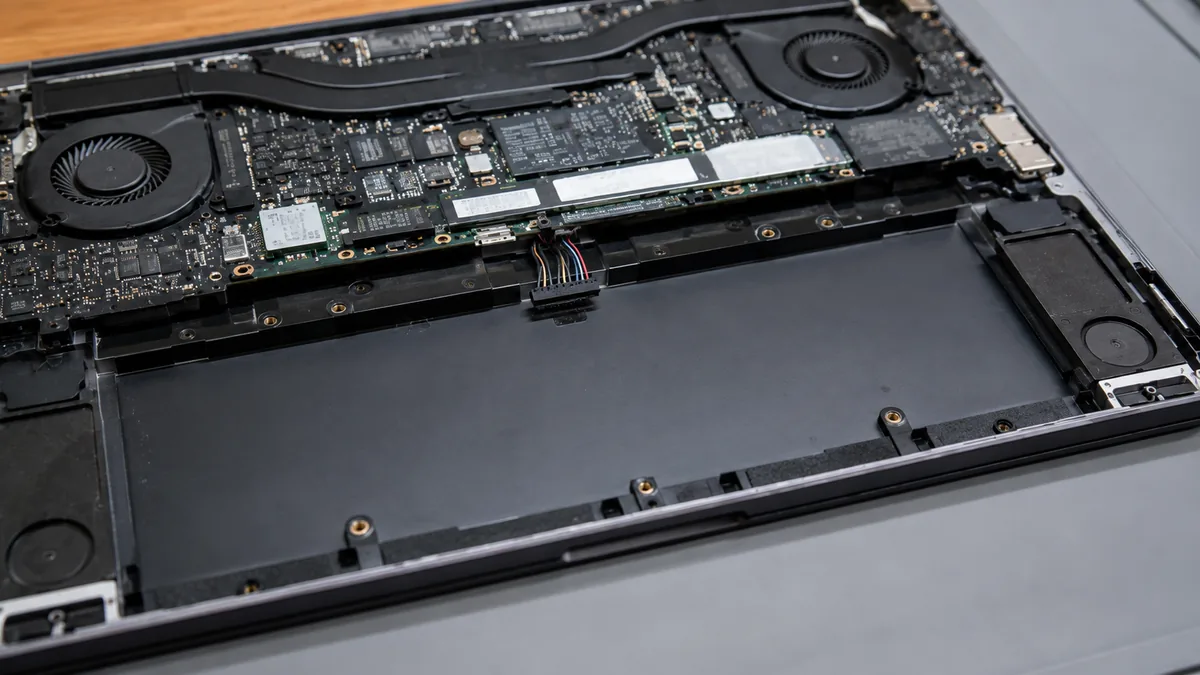
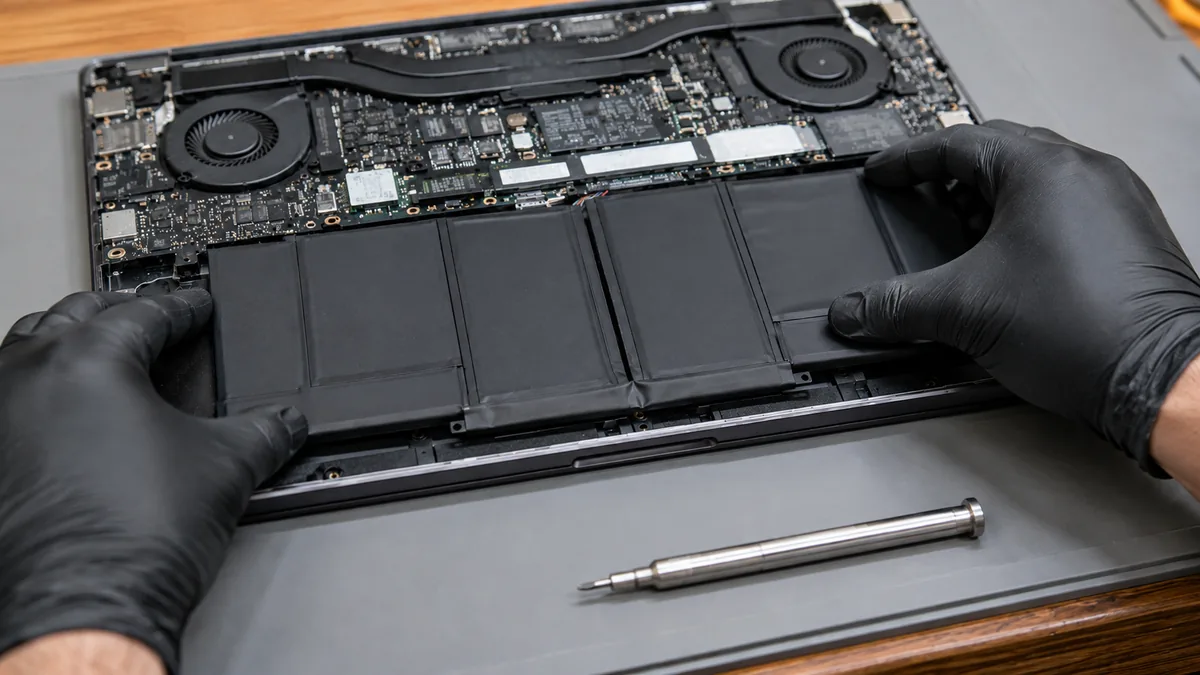
- Clip-in versus glued internal. This is the big one. A removable pack that latches out is almost pure part cost. A pack screwed and glued inside a thin ultrabook means opening the whole machine, easing out an adhered cell without stressing the board, then fitting and testing — real labour on top of the part.
- Capacity and cell count. A larger battery stores more energy and uses more or bigger cells, which costs more as a component. A slim 13-inch ultrabook pack and a big gaming-laptop pack are simply different parts at different prices, before any labour.
- Brand, model and part availability. A common, current model has cheap, readily stocked packs. A rarer, older or discontinued model may need a harder-to-source part, which adds both cost and a day or two of waiting. Sourcing is a genuine cost, not padding.
- Cell grade. The cells inside the pack decide runtime and safety. Quality cells with proper protection circuitry cost more than no-brand cells, and are worth it — more on that below. A suspiciously cheap battery quote usually means a lower grade of cell.
- Condition of the old pack. A healthy pack swaps cleanly. A swollen battery needs careful, safe removal and a check of whether the swelling has strained the trackpad, case or screen — which is assessed as part of the job.
- Whether it is really the battery. If the machine will not charge, the fault may be the charger, the DC-in jack or the board rather than the cell. Our laptop repair bench tests this so you are not paying for a new pack that was never the problem.
Why quality cells matter for safety and runtime
A laptop battery is not a single object — it is a set of lithium cells wired together with a small protection and management circuit. Everything you care about, the runtime and the safety, comes down to those cells. This is why a battery quote that is far below everyone else's should make you pause rather than celebrate. The way a shop hits a very low price is almost always by fitting cheap, no-brand cells, and those cells behave differently in ways you only discover later.
Cheap cells tend to hold less charge than the label claims, so the runtime you get on day one is already short of what it should be. Worse, they lose capacity faster, so a pack that felt acceptable at first can be back to a couple of hours within months. And the failure mode that matters most is swelling: low-grade cells are more prone to off-gassing and puffing up as they degrade, which is both a safety issue and a route to a second repair. We fit quality cells with proper protection circuitry because a battery is one of the few parts in a laptop where cutting corners on the component directly affects safety, not just performance. If you want your pack to last, the habits in our guide on how to protect your laptop battery make a real difference to how long a good pack stays good.
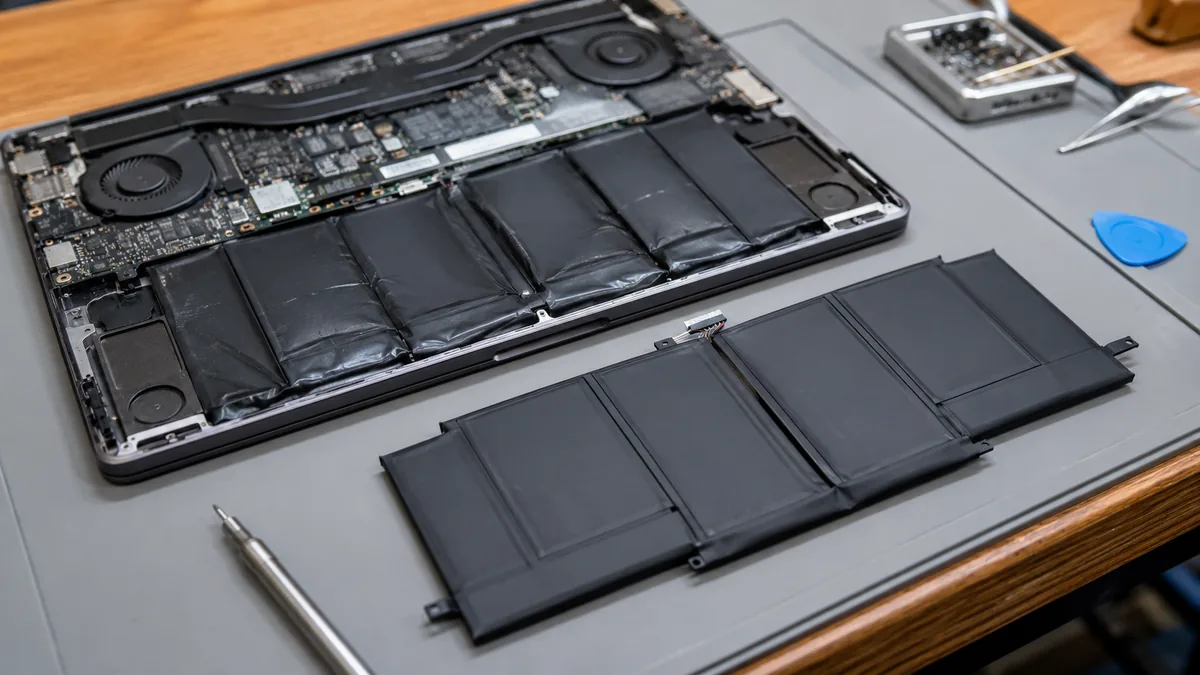
If your trackpad has started to lift, the case is bowing, the laptop rocks on a flat table or the base feels puffed, the battery is very likely swollen. That is a failing lithium cell off-gassing inside the case, not a cosmetic quirk. Stop charging it, do not press on it, and never puncture or pry at it. Power the laptop down, unplug it, and bring it in so the pack can be removed safely. Left in place, a swollen cell can crack the trackpad, strain the screen, or in the worst case become a fire risk. It is one of the few laptop faults where sooner is genuinely safer.
Swollen batteries: a safety issue, not cosmetic
Because swelling is the failure mode owners most often misread, it is worth spelling out. A lithium cell swells when it degrades and produces gas internally — the pack puffs up, and because there is nowhere for it to expand inside a tight chassis, it pushes on whatever is nearest. On most laptops that is the trackpad, which starts to lift or click oddly; on others the base plate bows, the keyboard deck rises, or the lid no longer sits flush. None of that is cosmetic. It is a clear signal the cell has failed and should come out.
The cost of replacing a swollen battery is not automatically higher than a healthy swap, but the work is more careful. The old pack has to be removed without stressing or nicking the cell, which matters most when it is glued in, and we check whether the swelling has already damaged nearby parts — a lifted trackpad, a strained ribbon cable, a bowed panel. Those are assessed and, if needed, quoted separately and clearly, so the bill matches the actual condition of the machine rather than a guess. If you are weighing whether an older, swollen-battery laptop is worth fixing at all, our repair-or-replace guide walks through that decision.
Why a firm quote needs a diagnosis first
Here is the single most useful idea in this guide: the same complaint — "my battery doesn't last" or "it won't charge" — can have several different causes, and each costs differently. Sometimes the pack has simply aged out and a replacement is the whole story. Sometimes the battery is fine and the real fault is the charger, the DC-in jack, or a board-level charging circuit, in which case a new pack would not have fixed anything. From the outside, before anyone opens and tests the machine, these look the same. That is why a firm price given over the phone is a red flag: it is either padded to cover the worst case, or it will change the moment the laptop is opened.
A diagnosis is what turns a guess into a real number. We confirm whether the pack is clip-in or glued, test the cell's health, and check that the charging path is actually working, so we know the fault is the battery and not something masquerading as it. At iDevice that diagnosis is free on walk-ins, and it ends in a written quote — the exact figure, the part grade, and the work — which you approve before we touch anything. Nothing is fitted, and you owe nothing, until you have said yes to a price in writing. We also work no-fix-no-fee: if we cannot resolve the fault you approved, you do not pay for the attempt. You can read exactly how our quote process works, or see the full bench method on our laptop parts replacement page. As with any repair, we are an independent shop and not affiliated with or authorised by any laptop brand.
Get a real figure for your battery
Bands are useful for planning, but the only number that matters is the one for your laptop and your pack. Bring it in, or send a photo and a short description of what it is doing — short runtime, not charging, or a case that has started to bow — and we will confirm the battery type, test the cell and charging path, and put the cost in writing before any work begins. Diagnosis is free on walk-ins, the quote comes with no obligation, and if the sensible answer is to replace the laptop rather than the battery, we will say so.
Want the real number for your battery?
Skip the phone-price guessing. A free, no-obligation diagnosis confirms whether your pack is clip-in or glued, tests the cell and charging path, and gives you the exact figure in writing. Walk in, or send a photo to start.
Keep reading
Guides that help you decide
Laptop battery replacement
How we replace clip-in and glued packs safely, with quality cells and a written warranty.
See the service →How to protect your laptop battery
Simple habits that slow wear and keep a good pack lasting longer before you need a swap.
Read the guide →Laptop repair cost in Singapore
Realistic price bands for the common repairs, and why a firm quote needs a diagnosis.
Read the guide →Questions we get every week
Laptop battery replacement cost — frequently asked questions
How much does a laptop battery replacement cost in Singapore?
There is no single figure, because the price depends on how the battery is fitted and what cells your model uses. An older laptop with a removable clip-in pack sits at the cheaper end, often in the region of a hundred dollars or a little more, because the part is simple and there is almost no labour. A modern ultrabook with an internal pack glued inside the case costs more, typically a couple of hundred dollars or higher, because the machine has to be opened, the old cell safely removed and a new one fitted and tested. Capacity, brand and how easily the part can be sourced all move the number. A free diagnosis confirms which type you have before we quote.
Why is my laptop's battery so much more expensive than my friend's?
Two things usually explain it: how the pack is fitted, and how easy the part is to buy. A friend with an older business laptop may have a battery that clips out in seconds with no tools, so the job is mostly the cost of the part. If your laptop is a thin ultrabook with the battery glued inside, the machine has to be opened, the adhered pack carefully lifted out and a fresh one fitted and tested, which adds labour. On top of that, a common model has cheap, readily available packs, while a rarer or older model may need a harder-to-source part that costs more. Higher-capacity packs also cost more than smaller ones.
Is a cheap no-brand laptop battery worth it?
Usually not, and it can be a false economy. The cells inside the pack are what store the energy, and cheap no-brand cells tend to hold less charge than they claim, lose capacity faster and are more likely to swell early. A pack that looks like a bargain can give you shorter runtime within months and, in the worst case, a swollen battery that presses on the trackpad or case. We fit quality cells with proper protection circuitry because the runtime and the safety of the machine depend on them. If a battery quote is far below everyone else's, it is worth asking exactly what cells it uses.
My laptop battery is swollen — is that dangerous and does it cost more to replace?
A swollen battery is a safety issue, not a cosmetic one, and it should be dealt with sooner rather than later. Swelling means the cell is failing and off-gassing, which is why it puffs up and can push the trackpad up, bow the case or strain the screen. Stop charging it, avoid pressing on it and do not puncture it. Replacement is not automatically more expensive, but the old pack has to be removed carefully and safely, especially when it is glued in, and any damage the swelling caused to nearby parts is assessed at the same time. Bring it in and we will remove it safely and quote the replacement.
Can you replace a MacBook battery, and does it cost the same as a Windows laptop?
Yes, we replace MacBook batteries, but they are their own case and priced separately from Windows laptops. MacBook packs are glued into the top case, and depending on the model the safe removal of the adhesive and the fitting of a new cell is more involved than a clip-in Windows pack, so the labour and part sit on a different scale. Because of that we cover MacBook battery pricing on its own dedicated page rather than lumping it in here. The principle is the same either way: we diagnose first, remove the old cell safely, fit a quality replacement and put the figure in writing before any work starts.
How long does a battery replacement take, and will I lose my data?
For a common model whose pack we have in stock, a battery replacement is often a same-day job, and for a simple clip-in pack it can be very quick. If the part has to be ordered in, or the battery is glued and needs careful removal, it may take a little longer, and we will tell you the timeframe when we quote. A straightforward battery swap does not touch your storage, so your files, apps and settings stay exactly as they were. If a swollen pack has damaged nearby parts, we will flag that separately before doing anything, so there are no surprises on the bill or to your data.
Get your battery diagnosed and quoted — free.
A free, no-obligation diagnosis confirms your battery type, tests the cell and charging path, and gives you the exact figure in writing with quality cells and a written warranty. No firm phone prices, no pressure — just a real number before you spend anything.