

iPad guides · Singapore
Common iPad problems and their fixes (2026): what you can solve yourself, and what needs a bench
An iPad is built to last years, which is why a fault feels so out of place. The good news: most iPad problems fall into a handful of familiar patterns, and a fair few have a two-minute fix you can do at home. This guide walks the common ones honestly — what to try first, and where the tablet's bonded construction means DIY does more harm than good.
On this page
- First, why an iPad is not a big iPhone
- Cracked glass and the bonded-assembly reality
- The iPad won't charge or won't turn on
- A frozen, black or unresponsive screen
- Battery that drains fast — or starts to swell
- Wi-Fi, touch and the everyday software gremlins
- DIY versus repair: an honest dividing line
- What iPad repair costs in Singapore
First, why an iPad is not a big iPhone
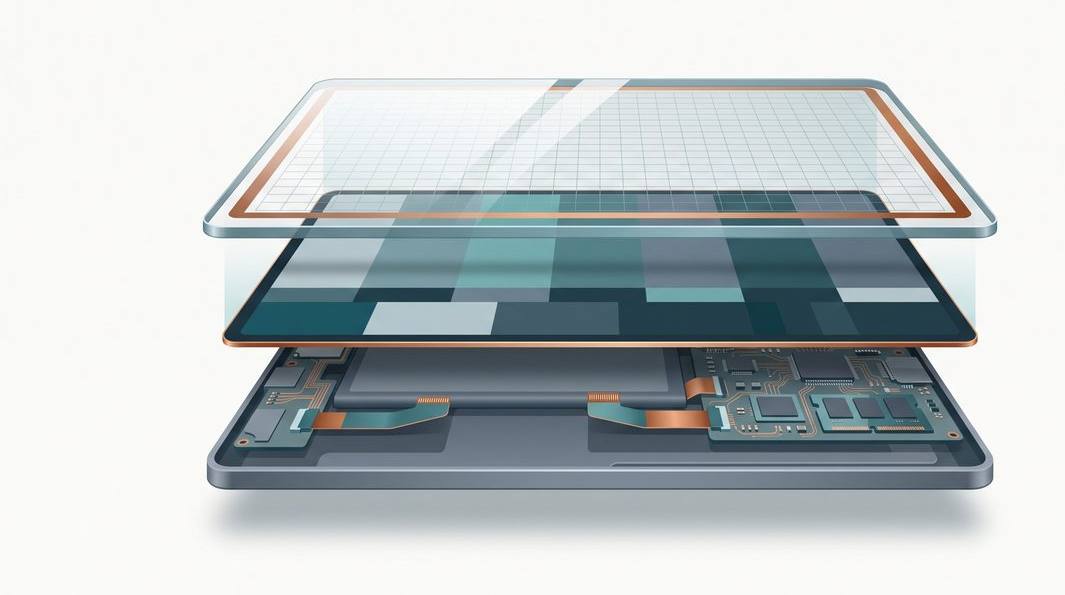
One thing shapes every repair on this page. An iPad is built very differently from a phone: the glass, the touch layer and the display panel are laminated into a single bonded unit, and on most modern models that unit is glued to the battery and the aluminium frame. There are no clips to pop and no quick swaps — which is why a fix that would be trivial on a laptop becomes a careful, heat-and-patience job on a tablet.
Plenty of iPad problems are a five-minute fix at home. But the moment a fault involves the screen, the battery or the charging circuit, the bonded build tips things firmly towards a workshop. We will be clear at each step about which side of that line you are on. If you would rather just have it looked at, walk-in iPad repair in Singapore comes with a free diagnosis and a written quote before anything is opened.

Cracked glass and the bonded-assembly reality
A dropped iPad with a spiderweb of cracks is the most common problem we see, and the one where online DIY advice does the most damage. On a phone you can sometimes prise a screen off and clip a new one in; on an iPad you cannot. The front glass, the digitiser that reads your touch, and the display are one bonded assembly, and separating them without shattering the panel underneath needs controlled heat, thin cutting wire and a steady bench.
If only the outer glass is cracked but the picture is perfect and touch still works, you can live with it briefly — but a crack lets moisture and grit reach the digitiser, which over weeks turns a cosmetic problem into ghost-touch and dead zones. If the display shows lines, black patches or bleeding colour, the panel is damaged and the whole assembly needs replacing. Either way, the fix is a proper iPad screen replacement, not a marketplace kit — those bond fresh glass over a still-broken panel or crack the LCD during the pry, turning a claimable problem into a full-assembly job.
Cracked but still working? Pop a screen protector over it to stop shards lifting, keep it away from keys and sand, and get it quoted soon — a hairline crack is far cheaper to address before moisture reaches the touch layer.
The iPad won't charge or won't turn on
A tablet showing a dead-battery icon, or nothing at all, sends most people straight to "the battery is finished." It usually is not. Work through the cheap causes first:
- The cable and adapter. Cables fray internally where you cannot see. Try a different genuine Apple cable and a wall adapter you know works — not a laptop USB port, which may not deliver enough power for a large iPad battery.
- The charging port. Pockets and bags pack lint into the port until the connector cannot seat. Shine a light in; if you see grey fluff, tease it out with a wooden toothpick — never metal. A surprising share of "dead" iPads are just choked ports.
- A frozen system. Sometimes the iPad has power but the software has hung. Force a restart (next section) and it may spring back.
If the port is clean, the cable is good and a force restart does nothing, you are into hardware: a worn battery, a failed charging circuit, or a board-level fault. The charging IC and the port sit on the logic board, so a persistent no-charge fault is often solved with iPad motherboard repair rather than a battery you did not need — which is why we diagnose before quoting.
A frozen, black or unresponsive screen
An iPad locked up on an app, the Apple logo, or a black-but-powered screen is frightening but usually harmless. The first move is always a force restart:
- iPads with a Home button: hold the top button and the Home button together until the Apple logo appears, then let go.
- iPads with no Home button: press and quickly release Volume Up, press and quickly release Volume Down, then hold the top button until the logo appears.
If it boots normally, note which app was open when it hung — one outdated app is a common trigger. If it reboots then freezes again on the same logo, that points to a software or storage issue a technician can usually clear without data loss. But when a force restart does nothing at all, you have crossed into hardware: a failed backlight, a loose display connector after a knock, or a board fault. If the tablet took a drop or a splash first, do not keep hammering the buttons — see the workshop team via iPad repair in Singapore and let it be checked cold.
Was there liquid involved? Do not charge it and do not keep restarting it — power plus moisture spreads corrosion across the board. Dry the outside, leave it off, and get it to a bench the same day. Speed is the single biggest factor in a clean liquid-damage recovery.
Battery that drains fast — or starts to swell
iPad batteries are large and long-lived, but nothing lasts forever. After a few hundred charge cycles you may see the tablet drop from full to flat quickly, shut down while it still claims 20 percent, or run warm at idle. Those are the classic signs of a tired cell, and a fresh battery restores the original runtime.
One symptom you must never ignore: if the screen or aluminium back starts to lift or bulge, the battery is swelling — a chemical process that pushes the pack apart from inside. A swollen iPad battery can crack the screen from behind and, in the worst case, is a fire risk. Stop using and charging it, keep it somewhere cool away from anything flammable, and get it to a technician; never press on the bulge or puncture it. Replacement is more involved than on a phone because the cells are firmly adhered and must be released with the right solvents, not levered out. If runtime has collapsed or you see any bulging, an iPad battery replacement is the fix, and we show you the health readings behind it.
Not sure if it is the battery, the port or the board?
Send us the model and one line on what it is doing — won't charge, screen cracked, frozen, or draining fast. You will get an honest read on the likely cause and a price band before anything is opened.

Wi-Fi, touch and the everyday software gremlins
Not every iPad problem is a hardware failure. Many are software hiccups you can clear in minutes, so rule these out first:
- Wi-Fi that will not connect. Move closer to the router, toggle Wi-Fi off and on, and forget then rejoin the network. If several devices struggle, the router is the suspect. If only the iPad refuses, try Settings → General → Transfer or Reset iPad → Reset → Reset Network Settings (it clears saved passwords).
- Patchy or ghost touch. Restart and remove any thick case or protector. Persistent dead zones or phantom taps point to a digitiser problem — often an old crack letting in moisture — and that is a screen-assembly job.
- Sluggishness and crashes. Usually just full storage. Check Settings → General → iPad Storage, offload unused apps, empty the Photos "Recently Deleted" album, and keep iPadOS updated. A single frozen app usually clears if you swipe it away in the app switcher and reinstall it.
If you have worked through the relevant checks and the fault survives, it is no longer a gremlin — that is the point to have it looked at rather than risk making a hardware fault worse.
DIY versus repair: an honest dividing line
We would rather tell you when not to pay us. Plenty of iPad problems are firmly do-it-yourself: swapping a suspect cable, clearing lint from the port, forcing a restart, resetting network settings, freeing up storage, reinstalling a misbehaving app. None risk the device, and any one might save you a trip.
The dividing line is the bonded, glued construction. The moment a fix means separating the screen, releasing an adhered battery, or working on the logic board, DIY stops being thrifty — the usual outcome of a home attempt is a cracked panel or a nicked ribbon cable on top of the original fault. Anything involving the screen, the battery, liquid, or a board-level power problem belongs on a bench. And if there is any hint of a swollen battery, or the data matters and the tablet will not boot, stop and get a free diagnosis. We repair every Apple device on one bench, so whether it is an iPad, an iPhone or a Mac, the same team assesses it — see our broader Apple repair in Singapore.
What iPad repair costs in Singapore
We never quote a firm figure before seeing the device, because "my iPad is broken" spans a S$0 network reset and a multi-part board rebuild. As a rough guide to the bands you might see:
- Software and port cleaning — often nothing, or a nominal charge.
- Battery replacement — from around the low hundreds, depending on model and how firmly the cell is adhered.
- Screen / bonded-assembly replacement — from around a couple of hundred upwards, higher on the larger Pro panels, quoted after we confirm what needs to go.
- Charging-port or board-level repair — variable, quoted only after diagnosis.
Whatever the fault, two promises hold: a written quote before any work begins, and component-level repair over swapping whole parts you do not need. If the data is your real worry and the tablet is dead, our data recovery service can often revive it long enough to back up, with no recovery fee if we cannot get it back. Walk-in diagnosis is free, so the honest first step for any problem above is to let us look — and we will still tell you if a straightforward iPad repair is not worth it on a very old model.
Questions we get every week
Frequently asked questions
Is it worth repairing an iPad or should I just buy a new one?
Usually worth repairing. iPads hold their value and last far longer than most phones, so a screen or battery fix — often the low hundreds — is a fraction of a new tablet. The exception is a very old model with a failing board, where the repair approaches replacement cost. We give you a written quote first, so you can decide with real numbers rather than a guess.
Why is iPad screen repair more expensive than a phone screen?
On most iPads the glass, the touch digitiser and the display are bonded into one assembly, and on many models the whole thing is glued to the battery and frame. There is far more to remove, and far more that can crack during the work, so it takes longer and the part costs more. A cheap DIY kit almost always ends in a worse break — it is one repair we strongly suggest leaving to a bench.
My iPad won't charge. Is the battery dead or the port?
It is often neither — the usual culprit is lint packed into the charging port, or a tired cable and adapter. Try a known-good Apple cable, and gently clear the port with a wooden toothpick. If it still will not charge or turn on after that, the fault is likely the battery, the charging circuit or a board-level fault, and it is worth a free diagnosis before you spend on parts.
Can you recover the photos from an iPad that won't turn on?
Usually yes. The data is safe on the storage; the tablet simply cannot boot to show it. A charging-port, battery or board-level repair can often revive the iPad long enough to back it up, and if it cannot be revived we move to board-level data recovery. There is no repair fee if we cannot fix it.
How long does an iPad repair take?
Most screen and battery jobs are same-day or next-day, because the bonded assembly needs careful heating, separation and re-sealing rather than a quick swap. Charging-port and board-level work can take longer, and we will tell you the realistic turnaround in writing before we start. Walk in for a free diagnosis and we will give you a firm timeline.
Keep reading
Related guides
iPad screen replacement in Singapore
Why bonded glass needs a bench, and what a proper screen-assembly repair involves.
iPad battery replacement
The signs of a tired or swelling cell, and how an adhered battery is safely replaced.
Data recovery in Singapore
Getting the photos back from a tablet or phone that will not turn on.
Get a written quote before a screw turns
Component-level diagnostics, a fixed price in writing, and no repair fee if we cannot fix it. Walk in Mon–Fri, or WhatsApp the workshop.