A laptop hinge that has gone loose, stiff or cracked is not a cosmetic annoyance — it is a
structural fault that quietly works on the screen and the cables every time you open the lid. This guide explains
what a failing hinge looks like, why it happens, the safe steps that protect your machine until it is fixed, and
why this is a workshop repair rather than a home one.
★★★★★ 4.8 Google rating940+ Google reviewsCaught early, it stays a small jobDiagnostics before you commit
The short version
A broken, loose or stiff hinge is a structural repair, not a DIY fix — and the single most important thing
you can do is stop using it. Every open and close tears the mounts further and brings a cracked screen or a
torn display cable closer. Do not glue or clamp it; that hides the real fault while the damage carries on
underneath. Open the lid gently from the centre if you must, back up your data, and get it to a workshop early,
while it is still a hinge job and not a hinge-plus-screen job.
A laptop hinge rarely fails all at once. It usually announces itself weeks or months ahead with small changes
that are easy to ignore — right up until the day the lid will not stay up or the corner of the screen cracks. The
earliest sign is often a change in how the lid feels: it becomes stiff and hard to start moving,
or it develops a notchy, uneven resistance where before it was smooth. At the other extreme, the hinge goes
loose: the screen no longer holds the angle you set it to, tipping forward or flopping back on
its own, or wobbling when you type. Either of those — too stiff or too loose — means the hinge is no longer doing
its job, and both put strain in places that were never meant to take it.
Alongside the feel, there is often a sound. A creaking, grinding or cracking noise as you
open or close the lid is the mechanism, or the plastic around it, being forced. And there are things you can
see. The palm rest or the top cover may start to crack near the hinge, where the mounting points
are pulling against the casing. The screen bezel can lift or bow away from the panel. A gap may open up between
the display and the base along the hinge line, sometimes wide enough that you can see the internal cables. In the
worst cases the whole corner of the machine looks like it is coming apart.
The reason all of this matters so much is what runs through the hinge area. The display cable
that carries the picture to the screen, and the Wi-Fi antenna wires that live in the lid, both pass from the base
into the top through the narrow channel beside the hinge. When the hinge binds or loosens, it can pinch, stretch
or chafe those cables. That is why a hinge fault sometimes shows up first as a flickering or dead
screen, or as Wi-Fi that keeps dropping for no obvious reason — the mechanical problem
is quietly damaging the electrical one. And because the panel is glass, the tension from a seized or misaligned
hinge can crack the display outright at the corner nearest the failing side. A hinge that is caught while it is
merely stiff or slightly loose is a small, contained repair; the same hinge left in daily use is what turns into
a cracked screen and a torn cable.
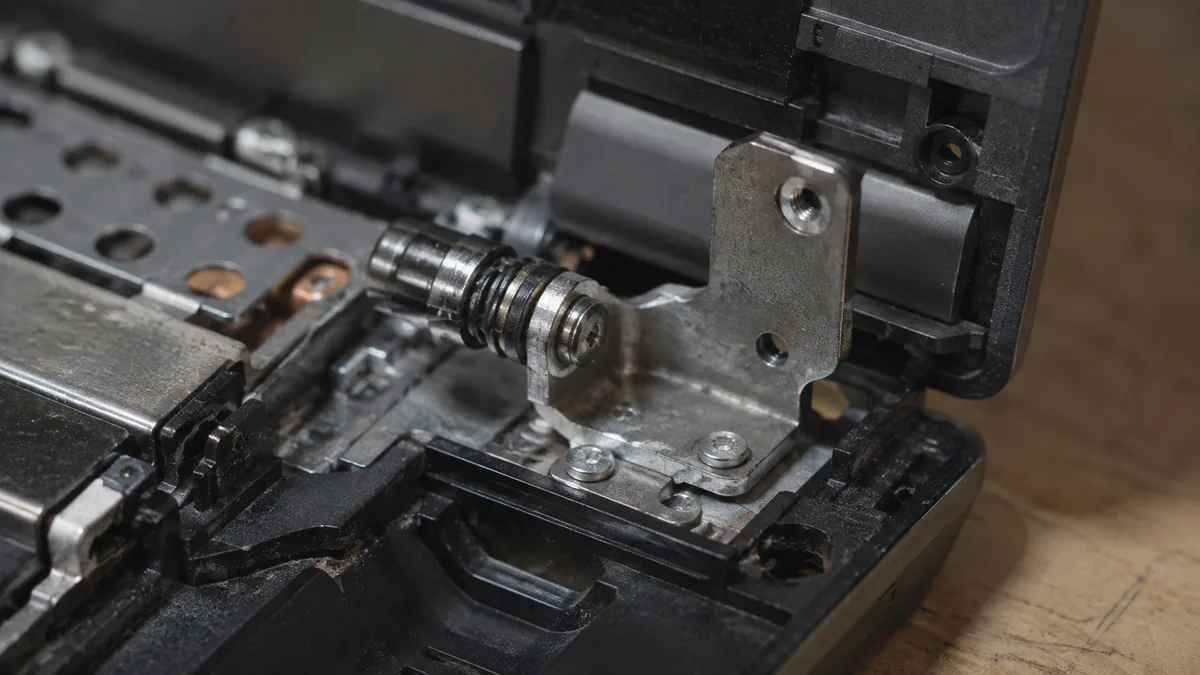
Underneath all of these symptoms is almost always the same root cause. The hinge is bolted to the chassis by
small screw bosses — posts moulded into the plastic of the case. Every time you open the lid,
the hinge levers against those posts, and on laptops that have been cost-engineered to a price, the posts are the
weakest link in the whole assembly. Over hundreds and thousands of open-and-close cycles they fatigue, and
eventually they crack or pull out of the casing entirely. Once a mount lets go, the hinge is no longer properly
anchored, so all of its force starts landing on whatever is still holding — the neighbouring mounts, the top
cover, the bezel, the glass. A hinge that has grown stiff accelerates the whole process, because the extra
resistance means far more force is fed into the mounts on every single open. That is the mechanism behind a hinge
that "just broke" on an ordinary morning: it had been failing quietly for a long time.
Laptop Hinge Broken, Loose or Stiff? What to Do &
Match your symptom to the cause
Use this quick reference to see what your particular symptom usually points to, and whether it is something
you can safely manage yourself or something that needs a workshop. With hinges, the honest answer for almost
every row is the same — protect it, then bring it in.
Quick diagnosis
Symptom-to-cause reference
A guide, not a guarantee — the only way to know how far a hinge has gone is to open the casing and inspect the mounts, which is exactly what our free diagnosis does.
SignWhat you noticeMost likely causeDIY or workshop
HNG-01Lid stiff, hard to start openingSeizing hinge, growing strain on mountsWorkshop, early
HNG-02Screen won't stay at set angleLoose hinge, worn or torn mountsWorkshop
HNG-03Creaking or cracking on open/closeMechanism or plastic being forcedWorkshop
HNG-04Palm rest or top cover crackingScrew bosses pulling out of chassisWorkshop
HNG-05Bezel lifting, gap along hinge lineMount detaching, lid separatingWorkshop
HNG-06Screen flickers or Wi-Fi dropsDisplay or antenna cable pinchedWorkshop, urgently
HNG-07Cracked screen corner near hingePanel stressed by seized hingeWorkshop, urgently
HNG-08Lid feels floppy, only one side movesOne hinge broken, load on the otherWorkshop
Not sure how far it's gone? Send us a photo.
Tell us the make, model and exactly what you see and hear when you open the lid. A technician replies with a probable cause and an honest price band before you travel — diagnosis is free on walk-ins.
A hinge is not a home fix — there is nothing safe you can do to repair one without opening the casing. What you
can do is protect the machine so the fault stays small until a workshop can rebuild it. These steps are
all about damage control, and every one of them matters, because the difference between a cheap hinge job and an
expensive hinge-plus-screen job is entirely down to how the laptop is treated between now and the repair.
Use it as little as you can. The most protective thing you can do is simply stop working
the hinge. Every open and close tears the loosened mounts a little further and brings a cracked screen or a
torn display cable closer. If the laptop can wait until it is repaired, let it wait, closed and flat.
Stop opening and closing it. If you do need to use it before the repair, open the lid
once, set your angle, and leave it there. Do not keep flipping it open and shut through the
day. Each cycle is another dose of strain on parts that are already failing.
Open from the centre, with two hands. When you must open the lid, lift it from the middle
of the top edge using both hands, so the force is shared evenly across both hinges. Never open it by one corner
— that twists the lid and dumps all the load onto the weaker side, which is exactly how a half-broken hinge
finishes breaking.
Never lift or carry the laptop by the screen. Always pick the machine up by the base or
keyboard deck. Lifting by the lid hangs the whole weight of the base off the hinges and the display cable — a
quick way to turn a loose hinge into a detached one, or to tear the cable.
Do not force a stiff hinge. If the lid has become hard to open, resist the urge to push
through it. A stiff hinge that is forced feeds enormous strain into the mounts and the top cover, and forcing
it is one of the most common ways people crack their own screen. Do not spray lubricant into it either — that
does not fix a seizing mechanism and can run down onto the board or the panel.
Back up your data. Because a failing hinge can pinch the display cable or crack the panel
without much warning, copy anything important to an external drive or the cloud now, while the screen still
works. If the display fails before your repair slot, you will be glad the files are already safe.
Do not glue or clamp it. This is the big one. Gluing the case or clamping the lid shut
does not re-anchor the torn mounts underneath — it just hides the movement while the tension keeps working on
the screen and the cable. Worse, glue traps the real fault and makes the eventual proper repair harder and
messier. Leave the fixing to a workshop.
Please don't do these
Do not glue, epoxy or clamp a loose hinge in the hope of holding it together — it hides the fault and traps
it for later. Do not force a stiff lid or squirt lubricant into the mechanism. Do not carry or lift the laptop
by its screen. And if you can already see the panel cracking at a corner, or the screen has started flickering
or the Wi-Fi keeps dropping, stop using the machine altogether and get it in — those are signs the hinge is
already damaging the display and its cables.
Laptop Hinge Broken, Loose or Stiff? What to Do &
When to get professional repair
With a hinge, professional repair is not the last resort — it is the main path, and the earlier you take it the
smaller the job stays. There is no safe way to re-anchor a torn mounting point without opening the casing, and
that is precisely the work a hinge repair involves. On the bench, a technician separates the display assembly from
the base, inspects the hinges and the mounting points, and rebuilds the anchor points that have failed — either
by re-forming and reinforcing the screw bosses in the chassis, by fitting new brackets, or by replacing the hinge
itself where the mechanism has worn or seized. Done properly, the load is spread the way the design intended and
the lid moves cleanly again.
The point of coming in early is that a hinge caught while the mounts are only starting to pull
is a contained, structural repair. The same fault left in service is what escalates:
The hinge and its mounts. Torn screw bosses and worn or seized hinges are re-anchored,
reinforced or replaced so the lid holds its angle and opens freely again. This is the core of our
laptop hinge repair service, and on many models it is a
same-week job.
The screen, if it has been stressed. If the tension from a seized hinge has cracked the
panel at a corner, the display is replaced at the same time — see our
laptop screen replacement service. Fixing the hinge without the
screen, or the screen without the hinge, only leaves half the fault in place.
The cables, if they were pinched. A display or antenna cable that has been chafed or
stretched in the hinge channel — showing up as flicker or dropping Wi-Fi — is inspected and replaced as part of
the same strip-down, so the electrical fault goes with the mechanical one.
If your hinge fault has spread into the top cover or the internal frame, that is still workshop territory
rather than a write-off; the way we approach any structural laptop fault is set out in our
laptop repair process, and if a diagnosis ever turns up a board
issue behind the symptoms, our laptop motherboard repair
service covers that too. Whatever the cause, the diagnosis comes first and is free on walk-ins: we open the
machine, show you exactly which mounts have gone and whether the screen or cables are involved, and quote the
work before anything begins. If we cannot fix it, you do not pay a repair fee. A hinge is one of the clearest
cases where acting early genuinely saves money — it is almost always worth getting it looked at before the small
fault becomes a big one.
Real reviews from our Google profile, shown with the customer’s name as they left it. The score and the count are Google’s own, updated every week.
★★★★★
Thank you iDevice for helping me recover the data from my bootloop iPhone. I had asked many other places for help, but none of them could do it without restoring the phonne only you guys managed to recover it successfully. I really appreciate it! 🙏
★★★★★
Managed to recover data from MacBook Pro 16” successfully. Professionally done. Thanks.
★★★★★
iDEVICE has good diagnostic knowledge of the faulty DELL laptop. Informed him of suspected battery problem and they could get a replacement for me after about a week for a new battery. Cost wise it’s reasonable.
Recommend to use them for any faulty laptop or handphone and found they can do data recovery too
★★★★★
great! managed to recover the data in my iPhone 11 Pro Max by fixing my motherboard.
★★★★★
I went to a couple of shops and they charge me tons to change my hinges. Here they helped me fixed it all together very well and now it looks like its in a good condition. The price is reasonable too i think. Also yay i got two months warranty too.
Thank you Technicians!!
★★★★★
Very professional and high quality service! They are competent in recovering data and repairing devices as well as very responsive. They managed to retrieve all of my files in macbook and iphone which were apple logo frozen/stuck and they also repaired the device successfully.
★★★★★
Managed to recover all my data and phone works just as fine! Thumbs up!
★★★★★
Good and fast service. Managed to recover my file. Thank you.
Questions we get every week
Laptop Hinge Broken, Loose or Stiff? What to Do &
Laptop hinge broken — frequently asked questions
Is a broken laptop hinge worth repairing, or should I replace the laptop?
Almost always worth repairing, provided you act early. A hinge fault caught while the mounts are only starting to pull is a structural repair that costs a fraction of a new laptop. What turns a cheap job into an expensive one is time: a loose hinge left in daily use eventually cracks the screen, splits the top cover further, or tears the display cable, and then you are paying for a hinge rebuild plus a panel. Bring it in early and we can usually re-anchor the mounting points and reset the hinge before any of that happens.
Can I fix a loose laptop hinge myself with glue or a clamp?
Please don't. Glue and clamps are the two most common ways a small hinge fault becomes a big one. The real problem is that the screw bosses holding the hinge have torn out of the plastic chassis, and glue on the outside does nothing to re-anchor them — it just hides the movement while the tension keeps working on the screen and the display cable underneath. A clamp holds the lid at a fixed angle and forces the strain somewhere else. A hinge is a structural repair that needs the casing opened and the mounts rebuilt properly, which is not a home job.
Why did my laptop hinge break when I was opening it normally?
Because the hinge is usually held to the chassis by small screw posts moulded into the plastic, and on cost-engineered laptops those posts are the weak point. Every time you open the lid, the hinge transfers that force into the posts; over hundreds of cycles they fatigue and eventually pull out, so the hinge that finally gives way on an ordinary open was already failing. A hinge that has become stiff makes this far worse — the extra resistance means more force goes into the mounts each time, which is why a stiff hinge should never be forced.
My hinge is stiff and hard to open — is that a problem or just age?
It is a warning worth taking seriously. A hinge that has grown stiff or notchy is no longer moving freely, so every open pushes extra strain into the mounting points and into the top cover around them. Left alone, a stiff hinge is one of the most common reasons a mount finally tears or a screen corner cracks. Do not try to free it with force or lubricant sprays. Have it looked at while it is only stiff — that is a much smaller job than the crack that a forced stiff hinge tends to cause.
Can a broken hinge damage my laptop screen or Wi-Fi?
Yes, and this is the main reason we ask people not to keep using it. The display cable and the Wi-Fi antenna wires run through the hinge area from the base into the lid. When a hinge loosens or binds, it can pinch or stretch those cables, which shows up as a flickering or dead screen, or as Wi-Fi that keeps dropping. The tension can also crack the panel itself at the corner nearest the failing hinge. Catching the hinge early usually spares the screen and the cables; leaving it rarely does.
Should I keep using my laptop until I can get the hinge fixed?
Use it as little as you can, and stop opening and closing the lid. Each cycle works the damaged mounts further and brings a cracked screen or a torn cable closer. If you must use it before the repair, open the lid once, gently, from the centre with two hands, set the angle and leave it there, and never lift or carry the machine by the screen. Back up anything important first, in case the display fails before you get it in. The less the hinge moves between now and the repair, the smaller and cheaper that repair stays.
Bring it in for a free diagnosis
Walk-ins welcome from the CBD, Orchard, Novena, Toa Payoh, Bishan, Ang Mo Kio, Jurong East, Clementi, Tampines, Bedok, Woodlands, Yishun, Hougang and Punggol. We open the machine, show you which mounts have gone, and tell you what it costs before any work begins.