
Troubleshooting guide · Singapore
Laptop shutting down by itself? Read the pattern before you worry
A laptop that cuts out without warning is unsettling, but the cause is usually one you can narrow down in minutes — most often heat, sometimes a tired battery or charger, and only occasionally the board. This guide shows you how to read the pattern of when it dies, the safe checks you can do at home, and the point at which it is worth handing to a workshop.
First, notice when it dies. If it shuts down when hot or under load, suspect overheating — check the temperatures and clean the vents. If it only cuts out on battery but runs fine on mains, suspect the battery — check its health and look for swelling. If it dies at random on both mains and battery, the fault is more likely on the board or in the memory. Heat, battery and cooling problems are common and affordable to fix; a board-level power fault is not a safe home job, but it is one we can diagnose before you commit to anything.
On this page
Why a laptop shuts down on its own
The first thing to settle is what kind of shutdown you are actually seeing, because two very different faults get described the same way. A normal restart — where Windows shows a shutdown or restart screen, or the machine reboots after an update or a blue screen — is a software event, and it leaves a trail in the logs. An instant power-off — where the screen goes black in a fraction of a second, as if someone pulled the plug, with no shutdown screen and no warning — is almost always a hardware, power or heat problem. That instant cut-out is the symptom this guide is about, and telling it apart from a tidy software restart is most of the battle.
When a laptop cuts out instantly, the cause is usually one of a handful of things, and the single most common by a wide margin is overheating. Every laptop has a thermal safety limit; when the processor or graphics chip reaches it, the machine kills its own power in a split second to avoid damage. That is why heat-related shutdowns nearly always strike under load — during a game, a video export, a long call or a browser full of tabs — and rarely when the machine is idle. In Singapore's climate, a dusty fan or dried-out thermal paste tips a lot of laptops over that limit far sooner than they should.
The next most common cause is the battery. A pack whose cells have aged can no longer deliver a steady current, so the laptop drops out under demand or dies well before the percentage reaches zero. The giveaway is the pattern: it shuts off on battery but behaves perfectly on mains. A faulty charger or a loose charging port produces a related but different pattern — the machine cuts out when the power flickers, or only when the cable sits at a certain angle. Beyond those, a power-circuit or PSU fault on the board can drop the whole machine at random, failing RAM can cause abrupt shutdowns and crashes, and a driver, Windows or malware problem can trigger unexpected restarts in software. Reading which of these you have comes down to the pattern: hot and under load means heat, battery-only means the pack, and truly random on both power sources means the board or memory.
Match your symptom to the cause
Use this quick reference to see where your particular symptom is likely to sit, and whether it is something you can safely check yourself or something for a workshop.
Quick diagnosis
Symptom-to-cause reference
A guide, not a guarantee — the only way to be certain is to monitor the machine under load and read the board on a bench supply, which is exactly what our free diagnosis does.
Not sure which one it is? Tell us the pattern.
Tell us the make, model, and exactly when it dies — under load, on battery, or at random. A technician replies with a probable cause and an honest price band before you travel — diagnosis is free on walk-ins.
Safe fixes you can try yourself
Work through these in order. They are all safe, none of them involves opening the laptop, and between them they will often identify the cause even when they do not fully cure it. Note what you find at each step — the pattern is what a technician needs. Stop at the first one that solves it.
- Check the temperatures and clean the vents. Because heat is the top cause, start here. Install a free temperature monitor and watch the CPU reading while you use the machine normally; if it climbs toward 95–100°C just before a shutdown, overheating is your trigger. Make sure the vents and fan grilles are not blocked, use the laptop on a hard flat surface rather than a bed or cushion, and gently blow the dust out of the vents with a can of compressed air (short bursts, do not spin the fan hard). A cooler machine that no longer cuts out under load confirms the diagnosis.
- Test mains versus battery. This one check isolates the battery. Run the laptop on the charger for a while, then unplug and run it on battery, and note when it dies. If it is rock solid on mains but cuts out on battery — or dies well before the percentage hits zero — the battery is the prime suspect. If it dies just as readily on mains, the battery is probably not the cause.
- Check the battery health. On Windows, open Command Prompt and run
powercfg /batteryreport; it saves an HTML report showing the design capacity against the current full-charge capacity. A big drop between the two means the pack is worn. While you are at it, feel and look around the base and trackpad for any swelling or a raised surface — a swollen battery is a safety issue and should be replaced promptly. - Try a known-good charger. If the shutdowns line up with the power flickering or the cable moving, borrow a known-good charger of the correct type and wattage and see whether the problem goes away. Check the existing cable for kinks or a spongy section near the plug, and make sure the charging port is not loose or full of lint. A failing charger is cheap to rule out.
- Update or roll back recent drivers. If the shutdowns began after a Windows update or a new graphics driver, the software may be at fault. Update your graphics and chipset drivers from the maker's site, or roll back a recent driver if the trouble started right after it. Check that your power plan has not been changed to something aggressive, and confirm Windows is fully up to date.
- Run the Windows Memory Diagnostic. Failing RAM can cause abrupt shutdowns and crashes. Type "Windows Memory Diagnostic" into the Start menu, let it restart and test the memory, and note any errors it reports. Errors here point at a memory fault that a workshop can confirm and fix.
- Scan for malware. Occasionally malware or a misbehaving background process is behind unexpected restarts. Run a full scan with Windows Security or a reputable scanner and clear anything it finds. This is quick, safe and worth ruling out before you assume the worst.
Do not keep using a laptop whose base or trackpad feels raised — that is a swollen battery, which is a fire risk, and it needs proper handling and replacement. Do not open the laptop to poke at the fan or reseat parts unless you know what you are doing, do not run a machine that had a liquid spill, and do not ignore repeated overheating shutdowns in the hope they go away — each hard cut-out stresses the board and risks corrupting your files or an update in progress.
When to get professional repair
If you have monitored the temperatures, tested mains against battery, checked the battery health and cleared the software side, and the laptop still cuts out, the cause has moved beyond a home fix. At that point it is usually one of three things, and each needs a workshop:
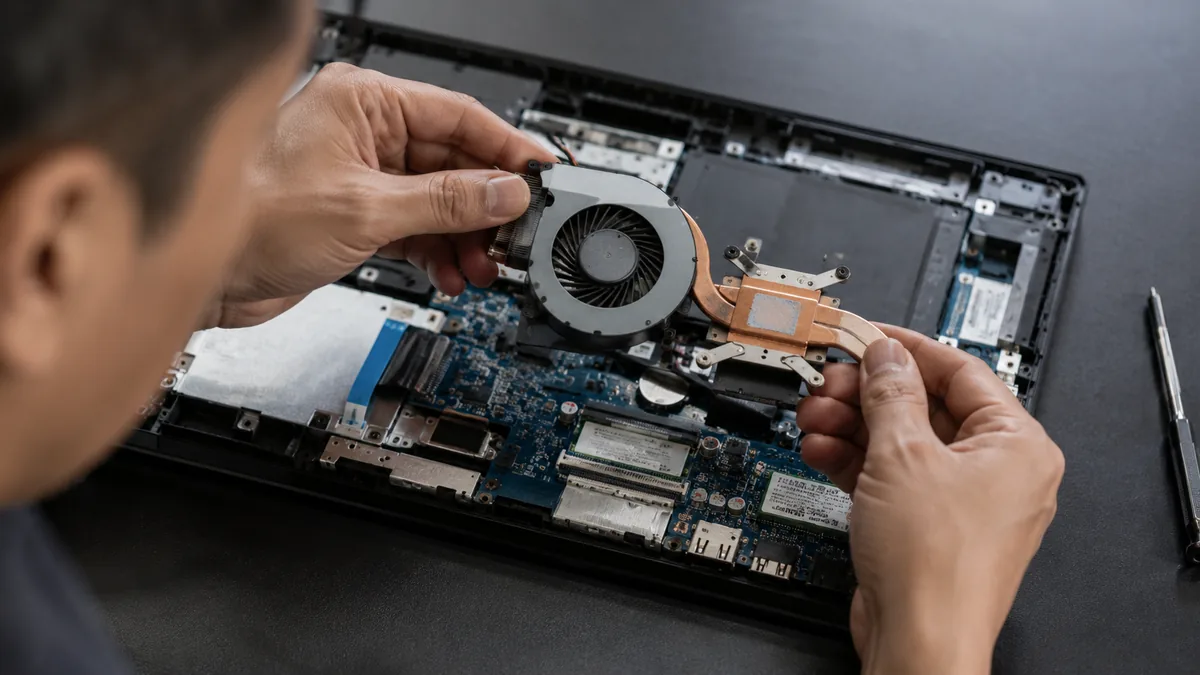
- A heat-related shutdown that survives a clean. If the machine still overheats after you have cleared the vents, the cooling system itself needs servicing — a seized or worn fan, or thermal paste that has dried out and stopped carrying heat away. Our laptop fan replacement and cooling service cleans the heatsink, renews the thermal paste and replaces a failing fan so the machine holds a safe temperature under load.
- A battery-related shutdown. A pack that fails its health report, cuts out on battery, or shows any swelling needs replacing — and a swollen cell is a safety matter that should not wait. Our battery replacement service handles these the same day on most models.
- A random shutdown on mains. A machine that dies at random even when plugged in points at a power-circuit fault on the board or a failing memory module, both of which need component-level diagnosis on a bench supply. Rather than replacing the whole board, our laptop motherboard repair service traces and fixes the actual failed component — usually at a fraction of the cost of a new board.
A spill or a knock just before the shutdowns began is the one case where you should not wait — liquid corrodes a board slowly, so a machine that started cutting out after a spill needs a workshop the same day. If the files on the machine matter and the shutdowns are getting worse, avoid heavy use and ask about data recovery, which reads the drive safely even when the laptop itself cannot be kept running.
Whatever the cause, our diagnosis comes first and is free on walk-ins: we tell you what is wrong and what it will cost before any work begins, and if we cannot fix it you do not pay a repair fee. Most random-shutdown laptops turn out to be a clogged cooler, a tired battery or a single failed part wearing a frightening symptom — it is almost always worth finding out which before you write the machine off. If you would like to see how we work through a job, our laptop repair process covers every brand step by step.
Related repair services
If it turns out to be hardware
Fan & cooling repair
Seized fans and dried thermal paste that let the machine overheat and cut out.
See the service →Battery replacement
Tired and swollen packs that drop out on battery, replaced the same day on most models.
See the service →Motherboard repair
Power-circuit and PSU faults behind random shutdowns, traced and fixed.
See the service →Questions we get every week

Laptop shuts down randomly — frequently asked questions
Why does my laptop suddenly shut down by itself without warning?
An instant power-off with no shutdown screen is almost always a hardware or power problem rather than a software one. The most common cause is overheating: when the processor hits a safety limit, the laptop cuts power in a split second to protect itself, usually while gaming, editing or running something heavy. Other causes are a failing or swollen battery, a faulty charger or loose charging port, a fault on the board's power circuit, or failing RAM. The pattern tells you a lot — dies when hot or under load points at heat, dies on battery but is fine on mains points at the battery, and dies at random on both points at the board or memory.
How can I tell if my laptop is shutting down from overheating?
Overheating shutdowns follow a clear pattern: they happen under load — during games, video calls, exports or many browser tabs — and the laptop feels hot, the fan is roaring, or the vents are blowing warm air just before it dies. It rarely happens when the machine is idle. Install a free temperature monitor and watch the CPU reading as the laptop works; if it climbs toward 95–100°C right before the shutdown, heat is the trigger. Cleaning dust out of the vents and improving airflow often helps, but a laptop that overheats after a clean usually needs its fan or thermal paste serviced.
My laptop shuts off on battery but works fine plugged in. What does that mean?
That pattern points squarely at the battery. If the laptop runs happily on mains but cuts out the moment you unplug it, or dies well before the battery percentage reaches zero, the cells can no longer hold or deliver a steady charge and the laptop drops out under demand. Run a battery health report to confirm — on Windows the command powercfg /batteryreport generates one that shows the design capacity against the current full-charge capacity. If the pack is worn, swollen or reporting a large drop in capacity, it needs replacing; a swollen battery in particular should be replaced promptly for safety.
Is a laptop that keeps shutting down dangerous to keep using?
It can be, depending on the cause. Repeated overheating shutdowns stress the board and can shorten the life of the components over time, and a swollen battery is a genuine fire risk — if the trackpad or base feels raised, or the laptop no longer sits flat, stop using it and have the battery replaced. Sudden power cuts can also corrupt files or an in-progress update, so save your work often while you troubleshoot. If the shutdowns are frequent or the machine is hot to the touch, it is safer to stop heavy use until the cause is found.
Can a software or driver problem make a laptop shut down on its own?
Yes, though it is less common than heat or power faults. A buggy graphics or chipset driver, a bad Windows update, a corrupt power profile or malware can all trigger unexpected shutdowns or restarts. Software shutdowns tend to be a little less abrupt than a heat cut-out and may leave an error in the event log. Try updating or rolling back recent drivers, running a full malware scan, and checking that your power settings have not been changed. If the machine still cuts out after that — especially instantly, with no error — the cause is far more likely to be hardware.
Is a laptop that keeps shutting down worth repairing?
Usually yes, because the common causes are among the cheaper repairs. Most random-shutdown cases we see come down to a clogged cooling system, dried-out thermal paste or a tired battery — all straightforward, affordable fixes that are well worth doing on a machine you otherwise like. Only a minority turn out to be a board-level power fault, and even those are often repairable at component level rather than replacing the whole board. We diagnose the actual cause before quoting, so you get an honest repair figure and a read on the machine's remaining value, and you decide with both numbers in front of you. Diagnosis is free on walk-ins and there is no fee if we cannot fix it.
Bring it in for a free diagnosis
Walk-ins welcome from the CBD, Orchard, Novena, Toa Payoh, Bishan, Ang Mo Kio, Jurong East, Clementi, Tampines, Bedok, Woodlands, Yishun, Hougang and Punggol. We tell you what is wrong and what it costs before any work begins.